
Resume Submission & Follow-Up Strategy
Table of Contents
Beyond the Submit Button: Strategic Submission
Submitting your resume isn’t just clicking “apply” on a job portal. The way you submit, when you submit, and how you follow up dramatically affects whether a recruiter sees your application.Most job seekers treat submission as the final step. Strategic job seekers know it’s just the beginning.
Step 1: Prepare Before You Submit
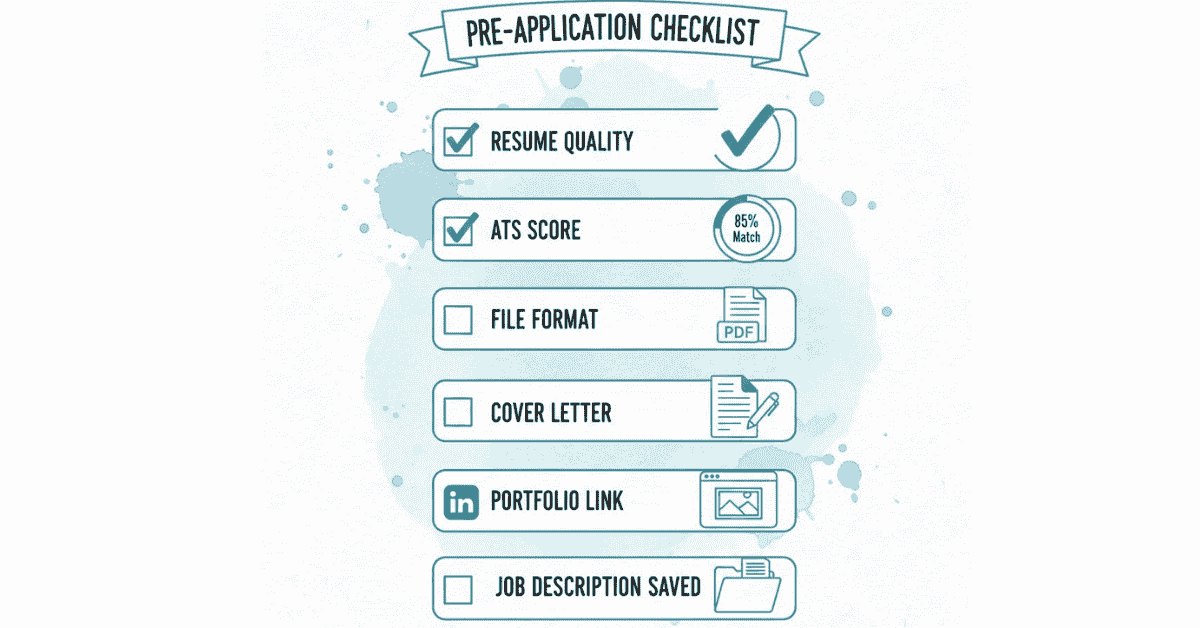
Create a Submission Checklist
Before you hit submit, verify:
Resume Quality:
- ✓ Zero spelling/grammar errors (proofread 3+ times)
- ✓ File named professionally (FirstName_LastName_Resume.docx)
- ✓ Saved in correct format (.DOCX for portals, .PDF only if requested)
- ✓ Resume customized for this specific job (keywords included, relevant bullets first)
- ✓ Contact information accurate and current
- ✓ All dates and achievements accurate
- ✓ ATS score tested (70%+ match rate)
Application Materials:
- ✓ Cover letter written (customized for the role, not generic)
- ✓ LinkedIn URL included in resume header
- ✓ Portfolio/GitHub link included (if relevant)
- ✓ Job description saved for reference (for follow-up)
Personal Preparation:
- ✓ Research company and role thoroughly
- ✓ Prepare interview talking points
- ✓ Review common interview questions
✓ Test phone/email (ensure you can be reached)
Step 2: Where to Submit
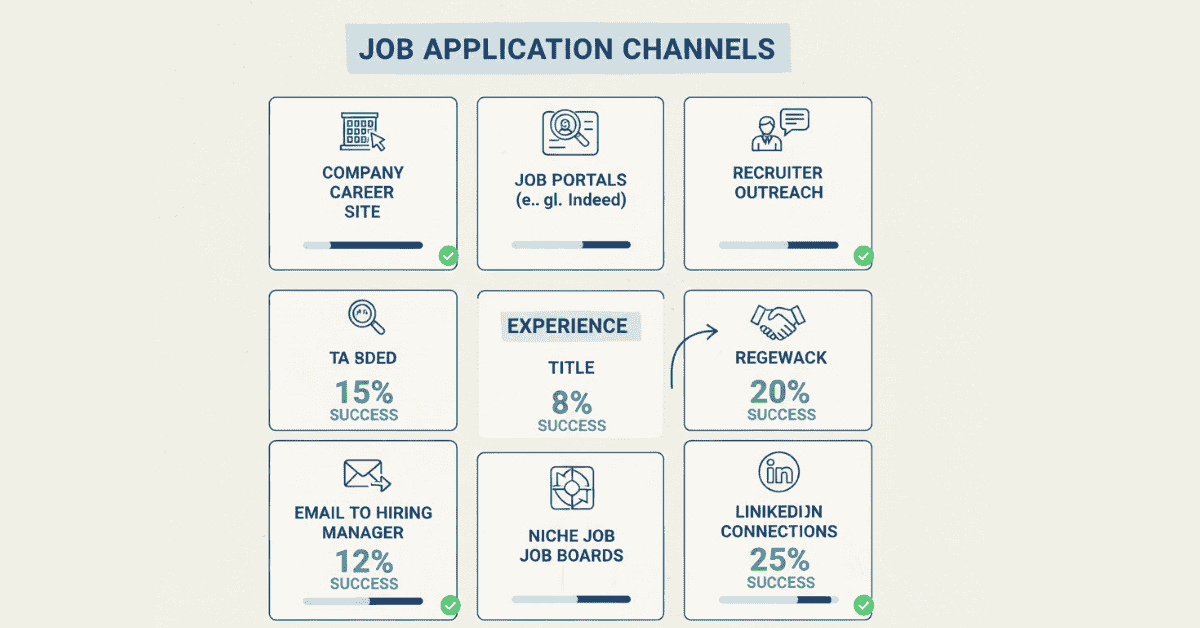
Different channels have different success rates.
Best Channels (in order of effectiveness):
**# Company Career Website (Direct Application)
- Success Rate: 20-35% of applications get reviewed
- Why: Fewer applicants, direct to company systems, signals serious interest
- Process: Go to company.com > Careers > Find job > Apply directly
- Pro tip: Apply quickly after job posting goes live (first 24 hours)
**#2: Job Portals with Apply Button (deed, LinkedIn Jobs, etc.)
- Success Rate: 5-15% reviewed (higher volume of applications)
- Why: Thousands apply, but still effective with strong resume
- Which to use: LinkedIn Jobs > Indeed > Naukri.com > AngelList (for startups)
- Pro tip: Use portal’s resume upload vs. uploading file (better ATS compatibility)
**#3: Recruiter Outreach (NetworkinginkedIn)
- Success Rate: 40-60% of applications reviewed
- Why: Pre-screened by human, not just ATS
- How: Connect with recruiter on LinkedIn > Message: “Hi [Name], I’m interested in [role] at [company]. Attached is my resume.”
- Pro tip: Find recruiters by searching “[Company Name] Recruiter” on LinkedIn
**# Email to Hiring Manager (Direct Outreach)
- Success Rate: 30-50% reviewed
- Why: Personal touch, not lost in portal
- How: Find hiring manager’s email (LinkedIn, company website, or Gmail format research) → Send personalized email + resume
- Pro tip: Subject line should be: “[Your Name] – [Role Title] Application”
**#5: Job Boards (AngelList, Hire Stack Overflow, etc.)
- Success Rate: 5-10% reviewed (depends on board)
- Why: Smaller, niche communities have lower volume
When to use: For specialized roles (tech, dev, design)

Step 3: Timing Matters More Than You Think
When to Apply:
Best Timing (Highest Visibility):
- First 24 hours after job posting (before it’s flooded with applications)
- Tuesday-Thursday (hiring managers most active)
- 9 AM – 12 PM (before lunch, when checking email)
- Early in the week (vs. Friday when managers check out)
Good Timing:
- Day 2-3 of posting
- Monday morning (fresh start to week)
- Wednesday (mid-week activity peak)
Avoid:
- First thing Monday morning (inbox flooded)
- Friday afternoon (less visibility over weekend)
- Weekends (job portals less active)
Pro Strategy: If a job is posted on Tuesday, apply Thursday morning. You’ll avoid the first-day flood but still be early.
Step 4: Upload File Correctly
File Format by Channel:
Job Portal (Indeed, LinkedIn, Naukri):
- Upload as .DOCX (most reliable)
- Don’t use Paste Resume feature (copy-paste loses formatting)
- Upload file directly to portal
Email Submission:
- Attach as .PDF (maintains formatting)
- Email body: Include 2-3 sentence cover letter
- File name in email: Attach as “FirstName_LastName_Resume.pdf”
Company Career Portal:
- Check portal requirements (usually accepts .DOCX or .PDF)
- Upload file if option available
- If portal has “paste” feature, paste formatted resume
Recruiter Email:
- Attach as .PDF (professional presentation)
- Include short email intro (2-3 sentences)
- Body should be professional, not just attachment
Pro Tip: Test your file before submitting
- Download it after you save it
- Open it and verify formatting looks correct
Check that all text is readable
Step 5: Write a Smart Cover Letter
Many applications have “Cover Letter” field. Some don’t. Either way, use it strategically.
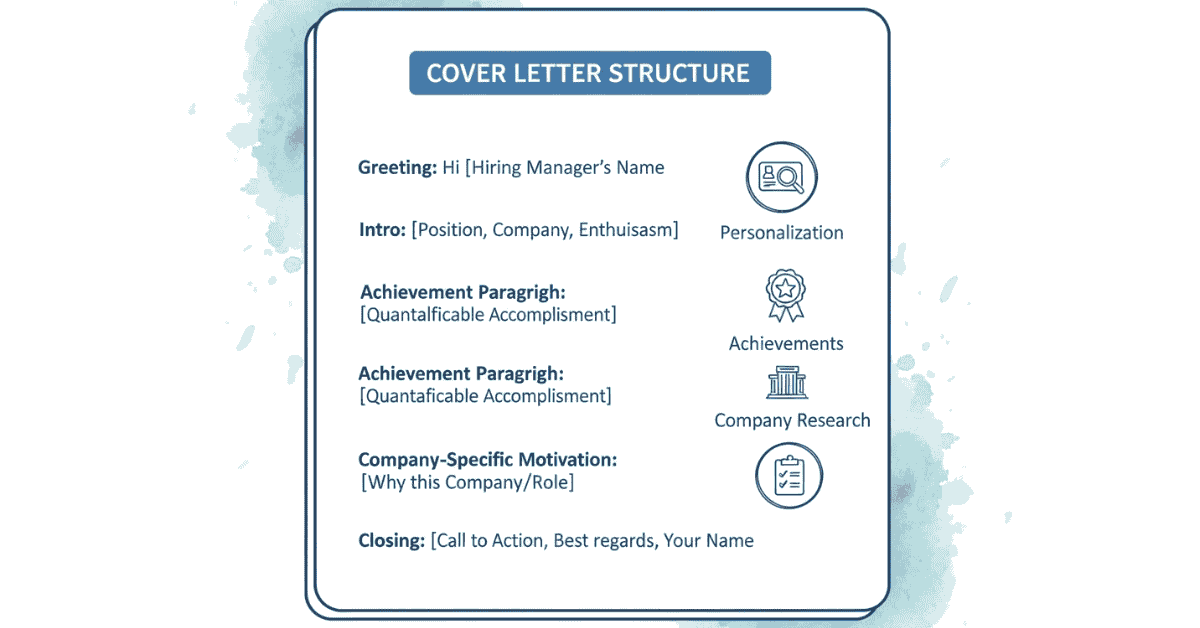
Cover Letter Purpose:
- Explain why you’re interested in THIS specific role at THIS specific company
- Highlight 1-2 key achievements most relevant to the job
- Show you researched the company
- Express genuine interest
Cover Letter Formula:
text
[Greeting]
I’m writing to express my interest in the [Job Title] position at [Company Name].
With [X years] of experience in [relevant field], I’m excited about the opportunity
to [specific value you’ll bring to this role].
In my current role at [Company], I [specific achievement that matches job requirements].
This directly aligns with [specific requirement from job description], and I’m confident
I can [specific outcome you’ll deliver].
I’m particularly drawn to [Company] because [specific reason—research their mission,
products, or values]. I’d welcome the opportunity to discuss how my experience in
[key skill] can contribute to your team’s success.
Thank you for considering my application. I look forward to hearing from you.
Best regards,
[Your Name]
[Phone]
[LinkedIn URL]
Real Example:
text
Dear Hiring Manager,
I’m writing to express my interest in the Senior Digital Marketing Manager position
at Frontlines Edutech. With 5+ years of experience building SEO and content strategies
that generate 6-figure revenue, I’m excited about the opportunity to scale your organic
channels and establish market leadership in the EdTech space.
In my current role at StartupXYZ, I built an SEO program generating $800K in attributed
annual revenue and establishing our company as a thought leader with 500K+ organic monthly
visitors. This directly aligns with your need for “someone to lead organic growth and
content strategy,” and I’m confident I can replicate this success for Frontlines.
I’m particularly drawn to Frontlines because of your mission to democratize education
across India. Having worked extensively in the EdTech space, I understand the unique
challenges of user acquisition in this sector and have proven strategies to succeed.
I’d welcome the opportunity to discuss how my expertise can contribute to your marketing
goals. I’m available for a call at your convenience.
Best regards,
Priya Sharma
+91-9876543210
linkedin.com/in/priya-sharma
Cover Letter DO’s:
- ✅ Customize for each role (mention company name, specific role, specific achievements)
- ✅ Keep to 3-4 paragraphs maximum
- ✅ Show research (reference company mission or specific products)
- ✅ Highlight 1-2 achievements most relevant to this job
- ✅ Proofread carefully
- ✅ Include contact information
Cover Letter DON’Ts:
- ❌ Generic letter (copy-paste for every application)
- ❌ Focus on what company will do for you
- ❌ Make it too long (they spend 30 seconds reading)
- ❌ Say “I am a team player” and “hard worker” (show, don’t tell)
- ❌ Complain about previous employer
Step 6: The Follow-Up Strategy
Most job seekers don’t follow up. This is your advantage.
Following up strategically increases your chances of being noticed by 2-3x.
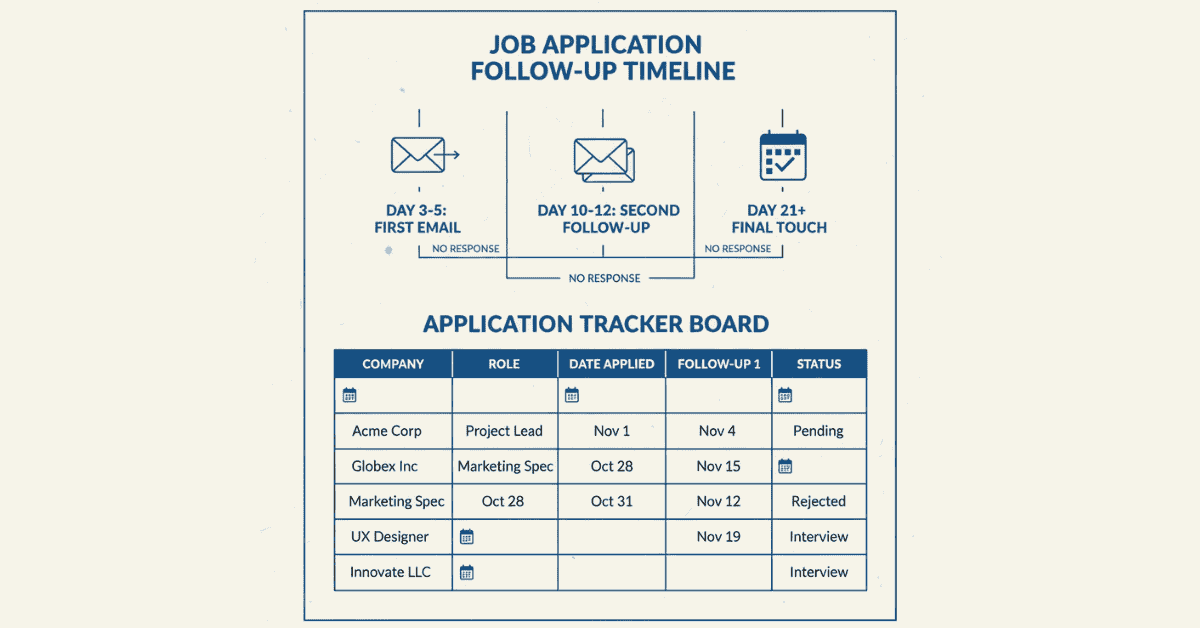
Follow-Up Timeline:
1-2 Days After Application:
Nothing. Wait. Let them see your initial application.
3-5 Days After Application:
If applied through company portal → Email hiring manager directly (if you found their contact)
If applied through recruiter → Email recruiter asking status
Email Template (Hiring Manager Follow-Up):
text
Subject: [Your Name] – [Job Title] Application Follow-Up
Dear [Hiring Manager Name],
I hope this email finds you well. I recently applied for the [Job Title] position on
[date], and I wanted to follow up on my application.
After researching your team’s work on [specific project/initiative], I’m genuinely excited
about the opportunity to contribute to [specific company goal]. With [X years] of experience
in [key skill], I’m confident I can drive [specific outcome] for your organization.
I’d appreciate any update on the status of my application, and I’m happy to provide
additional information or discuss how I can add value to your team.
Thank you for your time and consideration.
Best regards,
[Your Name]
[Phone]
[LinkedIn]
Email Template (Recruiter Follow-Up):
text
Subject: Status Update – [Your Name] – [Job Title]
Hi [Recruiter Name],
Thank you for considering my application for the [Job Title] role. I remain very interested
in this opportunity and wanted to check on the status.
I’m confident my background in [key experience] aligns well with the position requirements,
and I’d welcome the opportunity to discuss how I can contribute to the team.
Please let me know if you need any additional information from me.
Best regards,
[Your Name]
[Phone]

Follow-Up DO’s:
- ✅ Wait 3-5 days before first follow-up
- ✅ Keep follow-ups brief (2-3 sentences max)
- ✅ Remain professional and enthusiastic
- ✅ Reference specific details (role, company, date applied)
- ✅ Provide clear call-to-action (“looking forward to hearing from you”)
- ✅ Stop after 3 contact attempts
Follow-Up DON’Ts:
- ❌ Follow up immediately (same day)
- ❌ Send multiple emails within 24 hours
- ❌ Sound desperate or demanding
- ❌ Make it about you (“I really need this job”)
- ❌ Follow up after 30 days (move on)
❌ Send via multiple channels simultaneously (one email, not email + LinkedIn + phone call)
Step 7: Track Your Applications
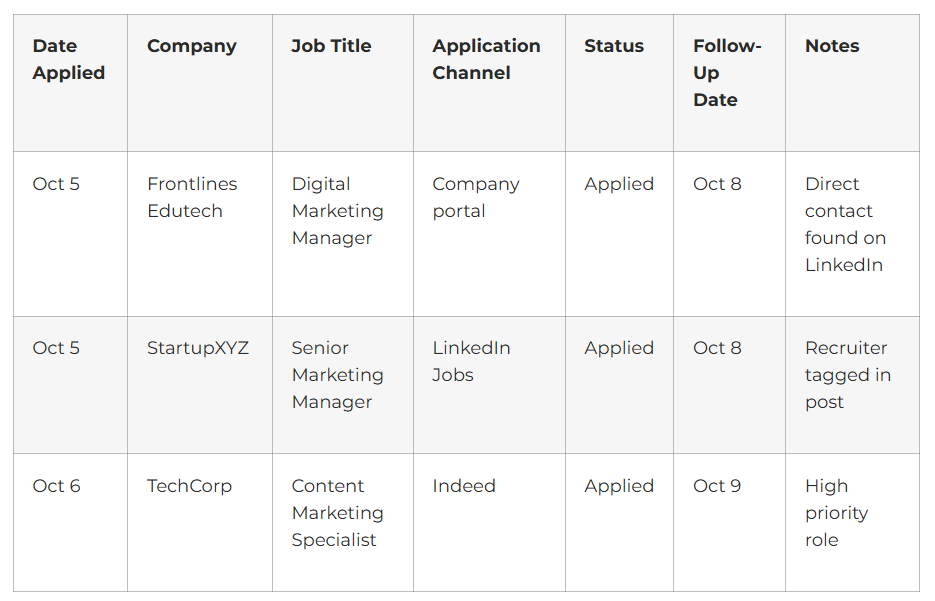
Create an Application Tracking Spreadsheet
Seriously. Track every application.
What to Track:
- Date applied (follow-up timing)
- Company and role (remember details)
- Application channel (to know how to follow up)
- Current status (applied, followed-up, rejected, interview scheduled)
- Hiring manager/recruiter name (personalization)
- Application deadline (if stated)
Benefits:
- Prevents duplicate applications
- Ensures timely follow-ups
- Shows application patterns (which channels work best)
- Helps you stay organized in job search
Step 8: Optimize Your Contact Channels
Ensure You’re Reachable
Phone:
- Professional voicemail greeting: “Hi, you’ve reached [Your Name]. Leave your message and I’ll get back to you.”
- Have phone nearby during business hours
- Answer unknown calls (they might be recruiters)
Email:
- Check email 2x daily during active job search (morning and afternoon)
- Use professional email address (FirstName.LastName@email.com, NOT theawesomedude@gmail.com)
- Set up vacation auto-reply if you’ll be unavailable
- Respond to recruiter within 24 hours (faster response = more serious candidate signal)
LinkedIn:
- Keep profile updated and matching your resume
- Check messages daily
- Update headline to job-seeker mode: “Open to [Job Title] roles | Currently at [Current Role]”
- Make profile public so recruiters can find you
Availability:
- Let employers know your availability
- “Available to start immediately” or “Available for interview on [dates]”
- Be flexible (don’t say “only Monday” if you can do weekdays)
Step 9: Salary & Negotiation
When Asked About Salary:
On Application Form:
- If required: Research market rate on Glassdoor, PayScale, LinkedIn Salary
- If optional: Leave blank or write “Negotiable” or “Open to discussion”
- Don’t anchor low (starts negotiation from lower number)
During Interview:
- “What’s your salary expectation?”
- Response: “Based on my research and the market rate for [role] in [city] with [X years] experience, I’m looking in the [X-Y] range. What’s the budget for this role?”
- Let them give number first if possible
Salary Research Resources:
- Glassdoor.com (company/role specific)
- Levels.fyi (tech industry focus)
- PayScale.com (general benchmark)
- LinkedIn Salary (LinkedIn users reporting)
Google Salary Search (general ranges)
Your Submission & Follow-Up Checklist
Before Submitting:
- ✓ Resume customized for this specific role
- ✓ Keywords from job description included
- ✓ Cover letter written (customized, not generic)
- ✓ File named professionally
- ✓ File in correct format (.DOCX or .PDF)
- ✓ Contact information verified
- ✓ Contact channels tested (phone, email, LinkedIn)
During Submission:
- ✓ Submit during optimal time (Tuesday-Thursday, 9-12 PM)
- ✓ Submit within 24 hours of job posting if possible
- ✓ Fill out all fields completely
- ✓ Add personalized cover letter (not generic)
- ✓ Upload file correctly to portal
After Submission:
- ✓ Save job posting details (for follow-up reference)
- ✓ Record application in tracking spreadsheet
- ✓ Set calendar reminder for follow-up (Day 4)
- ✓ Wait 3-5 days before following up
- ✓ Send personalized follow-up email
- ✓ Stop following up after 3 contact attempts
- ✓ Continue applying to other roles