
Search Optimization & Keywords
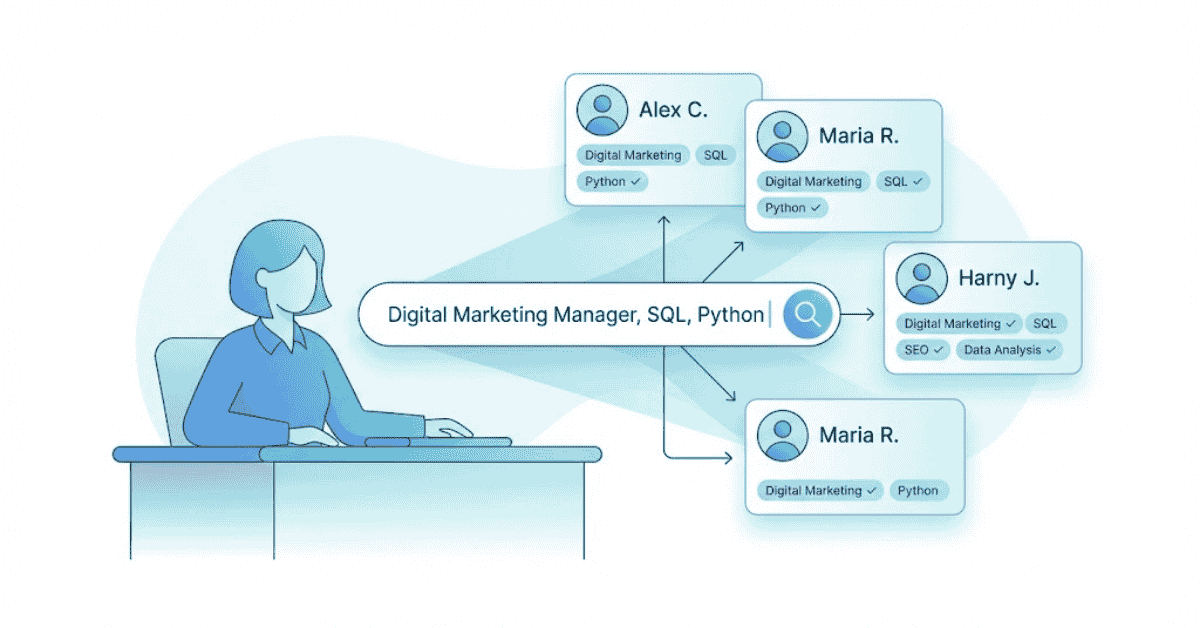
Table of Contents
Here’s a secret recruiters don’t advertise: they don’t browse LinkedIn profiles one by one. They search using specific keywords, and only profiles matching those keywords show up.
If your profile doesn’t contain the keywords recruiters search for, you’re invisible—no matter how qualified you are.
Recruiters search like this:
- “Digital Marketing Manager” + “Google Analytics” + “SEO”
- “Data Analyst” + “SQL” + “Python”
“Junior Developer” + “JavaScript” + “React”
Understanding How Recruiter Search Works
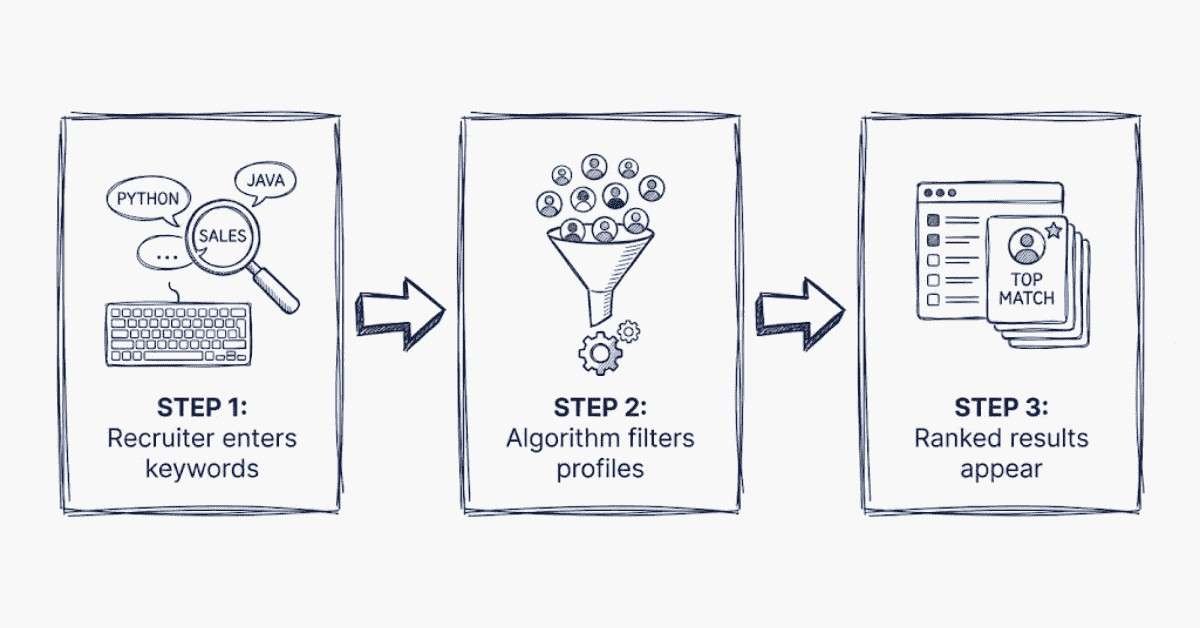
LinkedIn and job portals use algorithms to match search queries to profiles. Here’s the simplified version of how it works:
Step 1: Recruiter Types Keywords
A recruiter searches: “Digital Marketing Manager, Bangalore, 2-5 years”
Step 2: Algorithm Filters Profiles
The algorithm searches for profiles containing:
- “Digital Marketing Manager” (in headline, title, or experience)
- Located in “Bangalore”
- With 2-5 years of experience
Step 3: Ranking
Profiles with:
- Keywords in headline (most weight)
- Keywords in current job title
- Keywords in About section
- Recently updated profiles
- Higher engagement
…rank higher and appear first.
Bottom line: If a recruiter searches “Digital Marketing Manager” and your headline says “Marketing Professional,” you won’t show up.
“Want More Keyword Optimization Hacks? Explore Frontlines Media’s Career Resources →
The Keyword Research Method That Works
Most people skip keyword research and just write what sounds good. That’s a mistake.
Strategic keyword research takes 1-2 hours but can increase your visibility by 300%.
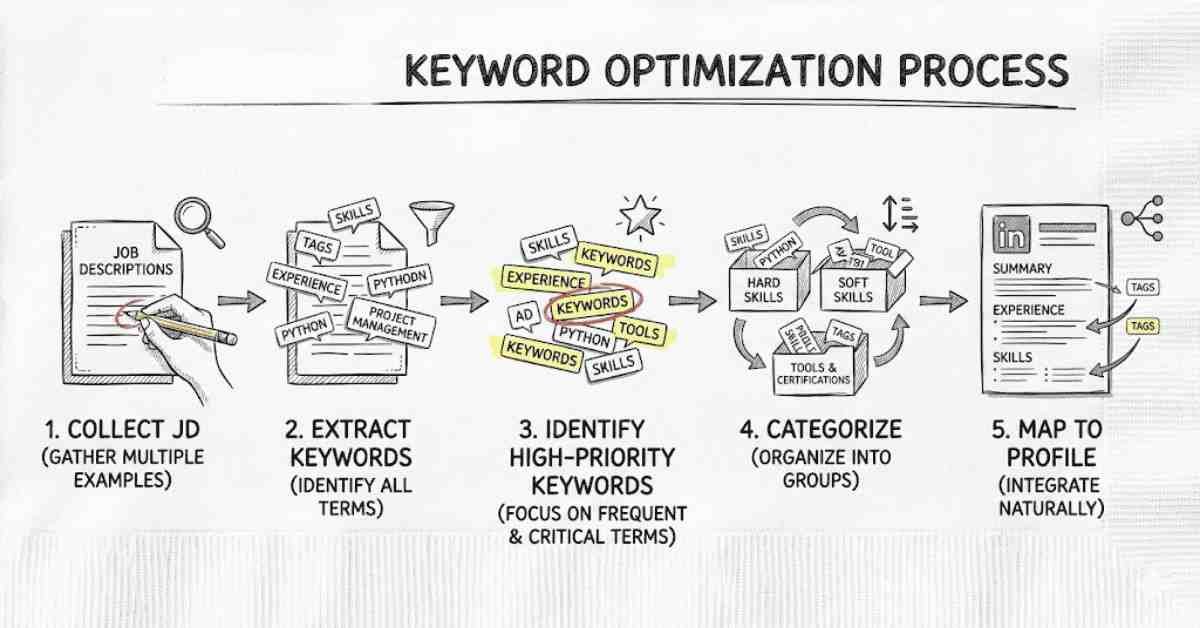
5-Step Keyword Research Process:
Step 1: Collect Target Job Descriptions (30 minutes)
Open 10 job descriptions for roles you want. You can find these on:
- LinkedIn Jobs
- Naukri.com
- Indeed
- Company websites
- AngelList (for startups)
Save them in a document or spreadsheet.
Step 2: Extract Keywords (30 minutes)
Go through each job description and highlight:
- Job titles
- Tools/software
- Certifications
- Responsibilities (summarized)
- Industry-specific language
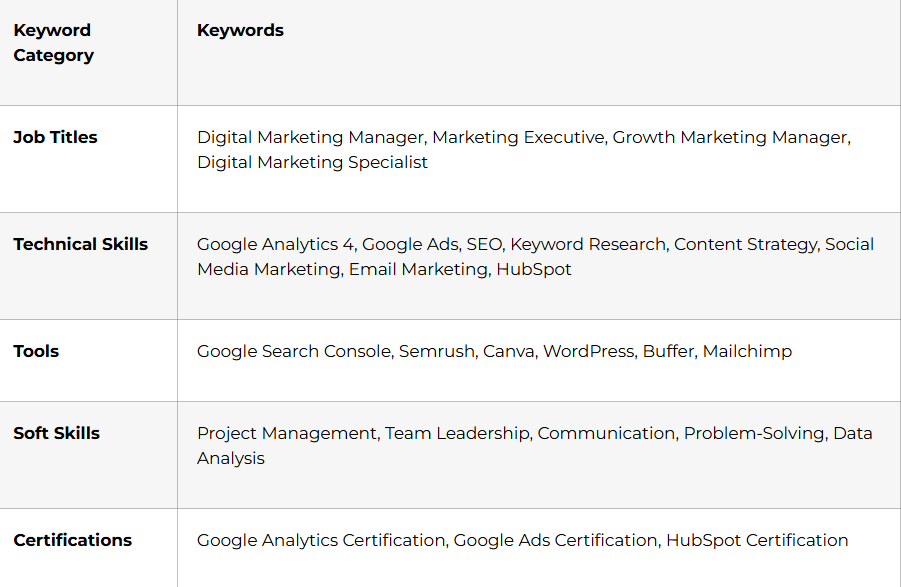
Create a master list. Example for Digital Marketing:
Step 3: Identify High-Priority Keywords (20 minutes)
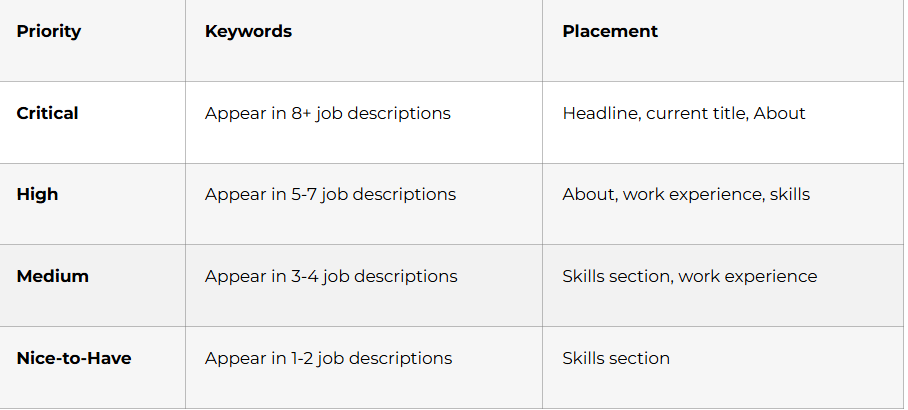
Which keywords appear in 7+ out of 10 job descriptions? These are your must-haves.
Example: If 8 out of 10 job descriptions mention “Google Analytics,” that’s a must-have keyword.
Step 4: Categorize by Priority (15 minutes)
Step 5: Map Keywords to Profile Sections (20 minutes)
Decide where each keyword fits best:
- Headline: 2-3 critical keywords
- Current Job Title: 1-2 critical keywords
- About Section: 5-7 critical + high priority keywords
- Work Experience: Keywords tied to achievements
- Skills Section: 10-15 keywords across all priorities
Featured Content: Keywords in titles
“Rank Higher in Recruiter Searches — Build Job-Ready Skills With Our Courses →”
Where to Place Keywords (Strategic Placement)
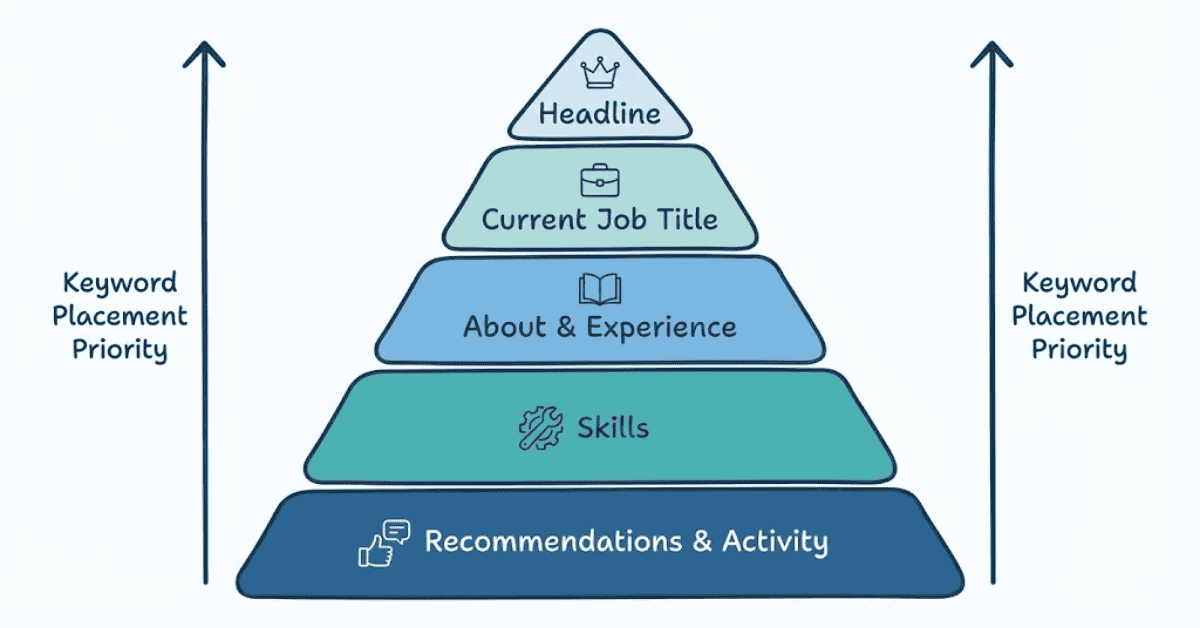
Keyword placement matters. LinkedIn’s algorithm weighs keywords differently depending on where they appear.
Highest Weight (Most Important):
- Headline – Keywords here signal what you’re known for
- Current job title – Direct indicator of your role
High Weight:
3. About section – Keywords here show expertise
4. Work experience description – Keywords linked to results
Medium Weight:
5. Skills section – Keywords show what you claim to know
Lower Weight:
6. Recommendations – Keywords in testimonials
7. Activity/posts – Keywords in content you share
Boolean Search: How Recruiters Find You
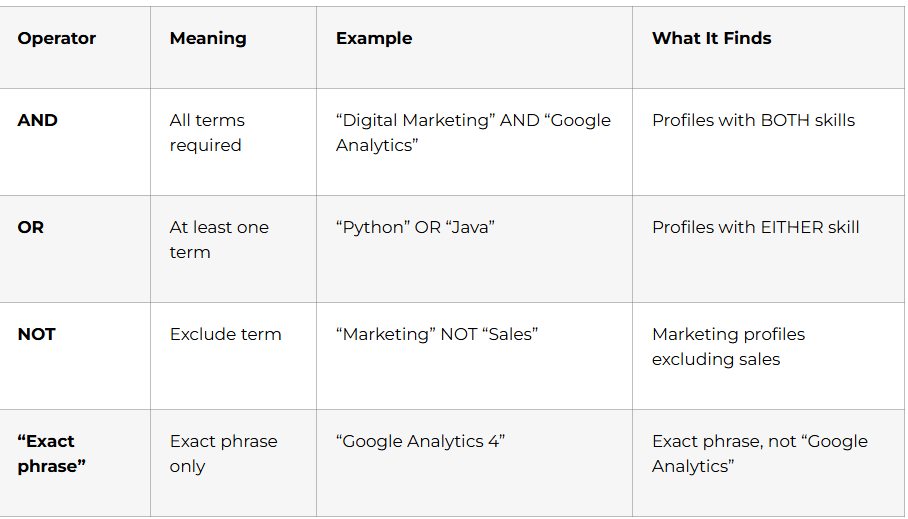
Recruiters don’t just search single keywords. They use Boolean operators to combine keywords.
Boolean Search Basics:
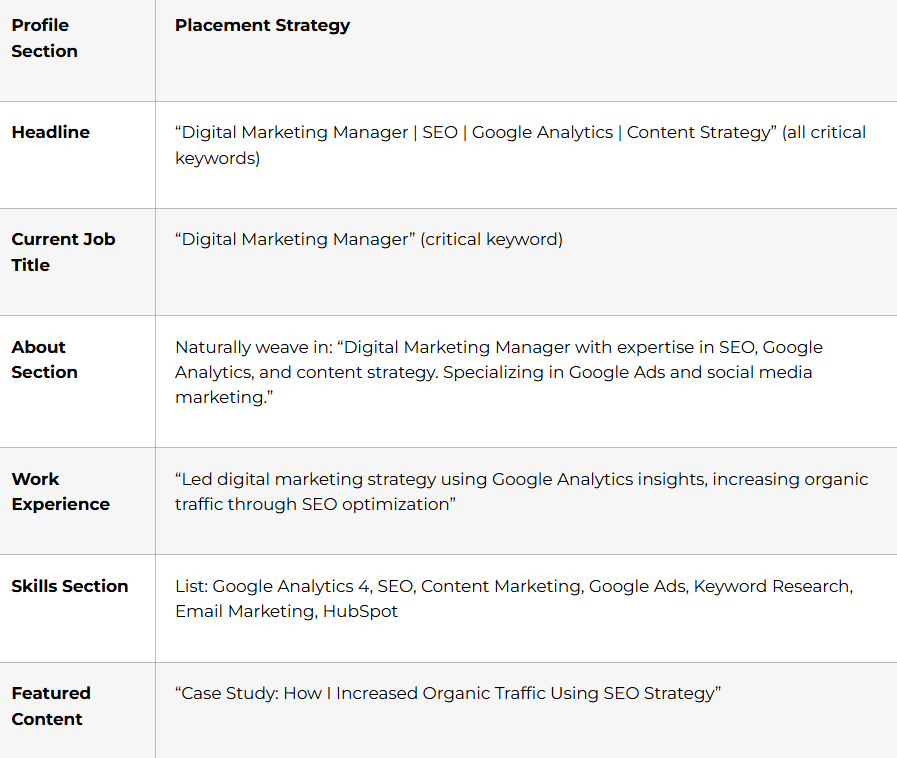
Strategic Placement Example (Digital Marketing Manager):
Real Recruiter Searches:
❌ Simple (Generic): “Marketing Manager”
(Returns 100K+ results; recruiters probably won’t find you)
✅ Boolean (Specific): “Digital Marketing Manager” AND “Google Analytics” AND “SEO” AND “Bangalore”
(Returns 500 results; much better chance of being found)
What does this mean for you?
When you include keyword combinations that recruiters search for, you match more specific searches. And specific searches have less competition.
If a recruiter searches “Digital Marketing Manager AND Google Analytics AND content strategy,” you want your profile to match all three.
Hidden Keywords Recruiters Search For (But You Don't Know)
Beyond job description keywords, recruiters search for hidden keywords that tell them about your career stage, intent, and situation.
Intent Keywords:
- “Open to work” (in About or headline)
- “Actively seeking” (signals immediate availability)
- “Available” or “Looking for opportunities”
Career Stage Keywords:
- “Fresher” (tells recruiters you’re entry-level)
- “2 years of experience” (tells recruiters your level)
- “Career changer” (explains role transition)
Location Keywords:
- City names (“Bangalore,” “Hyderabad”)
- “Remote” (if you’re open to remote work)
- “Willing to relocate”
Example: A recruiter might search “Digital Marketing Fresher AND Bangalore AND Open to work”
If your profile says you’re a “Fresher in Digital Marketing looking for internship,” you’ll show up. If it says “Marketing Professional” with no clarity on your level, you won’t match this search.
“Explore More Guides on Keywords, Profile Optimization & Job Search Strategy ”Read Career Guides →
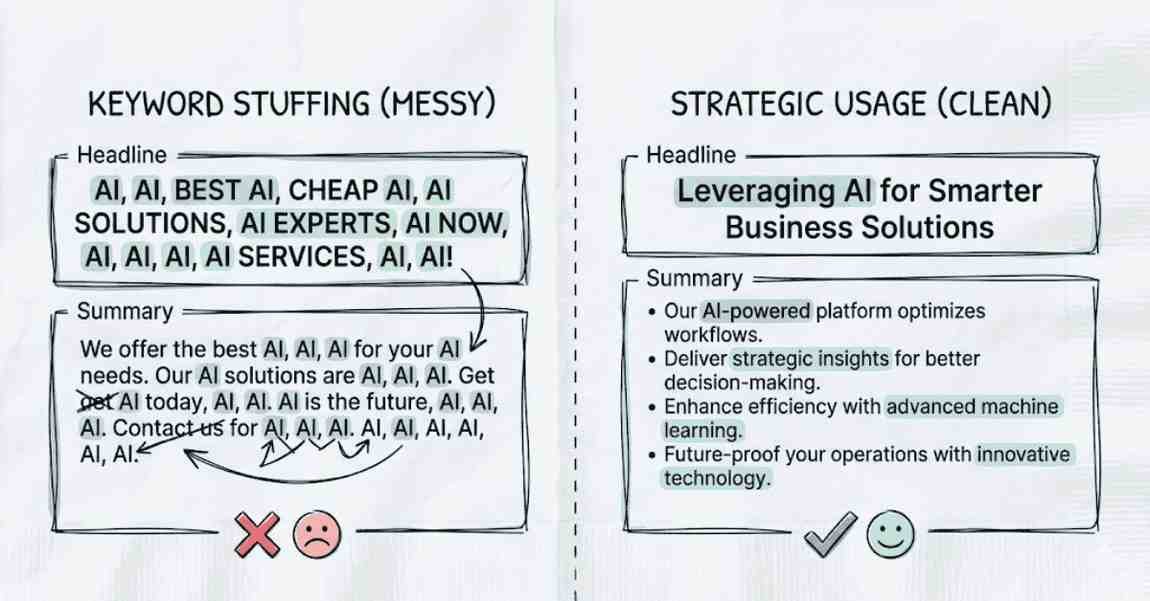
Avoiding Keyword Stuffing (It Hurts Your Credibility)
There’s a line between strategic keyword placement and keyword stuffing (overdoing it).
❌ Keyword Stuffing (Looks Fake):
“Digital Marketing Manager | Digital Marketing Specialist | Digital Marketing Executive | Digital Marketing Strategist | Digital Marketing Expert | Google Analytics | Google Analytics 4 | Analytics | Web Analytics | Google Ads | Ads | Advertising | Facebook Ads | LinkedIn Ads…”
This screams “I’m trying too hard” and kills your credibility.
✅ Strategic Keywords (Looks Natural):
“Digital Marketing Manager | SEO | Google Analytics | Content Strategy”
This is keyword-rich but readable. It tells recruiters what you do without feeling forced.
How to avoid keyword stuffing:
- Read your headline/about aloud – Does it sound natural? If you’re wincing, it’s overstuffed.
- Limit keywords to what fits naturally – 3-4 in headline, 5-7 in about
- Use keywords in context – “Led SEO strategy that increased traffic” is better than just “SEO, traffic, strategy”
- Vary your language – Don’t repeat “Marketing Manager” five times
Keywords in Different Scenarios
For a Fresher (First-Time Job Seeker):
Keywords to prioritize:
- Your target role: “Digital Marketing Fresher,” “Junior Marketing Executive”
- Technical skills from course/internship: “Google Analytics,” “Content Writing,” “Social Media”
- Certifications: “Google Analytics Certified,” “HubSpot Certified”
- Intent: “Seeking first marketing role,” “Open to internship”
Example Headline:
“Digital Marketing Fresher | Google Analytics Certified | Content Writing | Social Media | Seeking First Marketing Role”
For an Experienced Professional (5+ Years):
Keywords to prioritize:
- Your role with seniority: “Senior Digital Marketing Manager,” “Marketing Director”
- Leadership keywords: “Team Leadership,” “Campaign Strategy,” “Strategic Planning”
- Results keywords: “Increased Revenue,” “Scaled Campaigns,” “Led Team”
- Advanced skills: “Marketing Attribution,” “Advanced Analytics,” “Growth Strategy”
Example Headline:
“Digital Marketing Director | Team Leadership | Growth Strategy | $10M+ Marketing Budget | Open to Director/VP Roles”
For a Career Switcher (Moving to New Field):
Keywords to prioritize:
- New role: “Data Analyst (Career Changer),” “UX Designer (Transitioning)”
- New skills: “Python,” “SQL,” “Figma”
- Transferable skills: “Project Management,” “Communication,” “Problem-Solving”
- Context: “Finance Professional Transitioning to Data Analytics,” “Bootcamp Graduate”
Example Headline:
“Data Analyst (Career Changer) | Python | SQL | Tableau | Finance Background | Bootcamp Graduate”
Keyword Seasonality & Trends
Keyword relevance changes with industry trends.
Example: In 2024-2025, keywords like “AI,” “ChatGPT,” “Prompt Engineering” became highly searched.
If you’re in tech/marketing and don’t mention AI, you’re missing searches.
How to stay current:
- Review job descriptions quarterly – Are new keywords appearing?
- Follow industry news – What skills are companies suddenly hiring for?
Update your profile seasonally – Add trending keywords if relevant to your expertise
Optimize Your Resume Too
Action Steps: Keyword Optimization This Week
Day 1: Keyword Research (1 hour)
- Collect 10 job descriptions for your target role
- Extract keywords into a spreadsheet
- Identify critical keywords (appear in 8+ descriptions)
Day 2: Keyword Mapping (30 minutes)
- List where each keyword fits (headline, about, skills)
- Create priority ranking (critical, high, medium)
- Draft your keyword-optimized headline
Day 3: Profile Update (30 minutes)
- Update headline with critical keywords
- Weave keywords naturally into About section
- Add keywords to skills section
- Ensure keyword combinations align with recruiter searches
Day 4: Test & Monitor (20 minutes)
- Search for your own profile using recruiter keywords
- Do you show up in relevant searches?
- Adjust keywords if needed
This Week:
- Monitor profile views (should increase with better keywords)
- Note which keywords result in more recruiter messages