
Web Design Career Guide: HTML, CSS & Responsive UI
Table of Contents
Introduction: Why Web Design Is Essential in India's Digital-First Economy
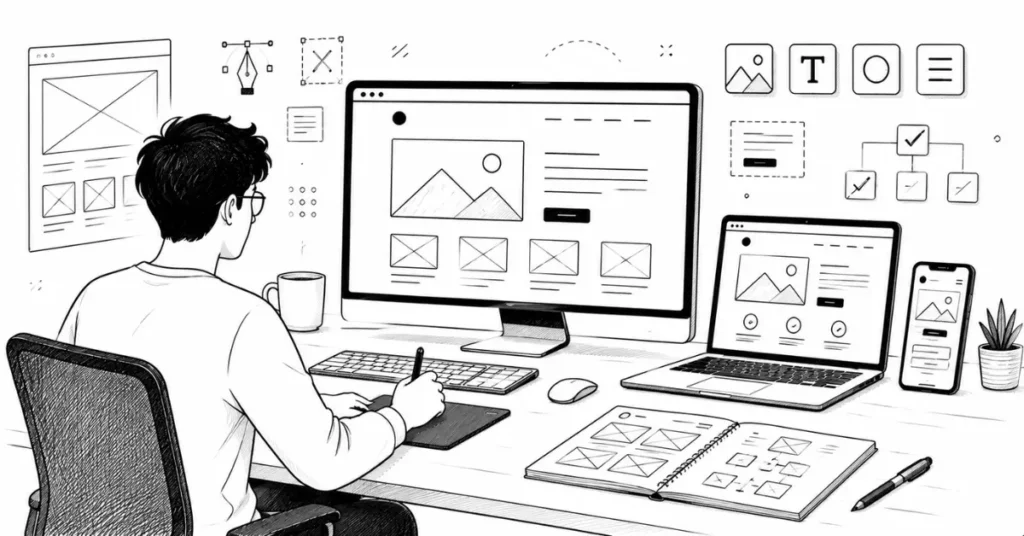
Every business in India today needs a website from the local sweet shop in Jaipur setting up online orders to Bengaluru startups raising millions in funding. E-commerce is booming, government services are moving online, and even traditional businesses are creating digital presence.
This massive digital transformation means one thing: constant demand for skilled web designers who can create websites that look beautiful, work smoothly, and help businesses achieve their goals.
But here’s what confuses many beginners what exactly is web design? How Web Design is different from web development? Do you need to code? Can you design websites without being a programmer?
This comprehensive guide will answer all these questions. You’ll learn what web designers actually do, the skills you need (both design and technical), realistic salary expectations in India, tools you should master, and a clear roadmap to become job-ready.
Web Designer vs Web Developer: Understanding the Difference
This confusion stops many creative people from exploring web design careers. Let’s clarify once and for all.
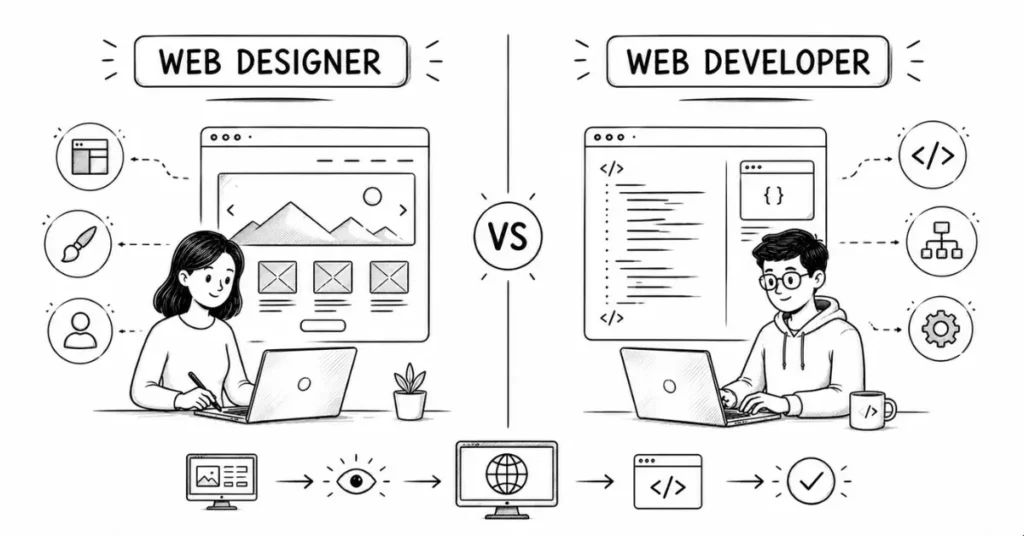
What Does a Web Designer Do?
Web designers focus on the visual and experiential aspects of websites
Visual Design:
- Layout and composition
- Color schemes and branding
- Typography and visual hierarchy
- Images, icons, and graphics
- Overall aesthetic and style
User Experience (UX):
- How users navigate the site
- Information architecture
- User flow and journey
- Intuitive interface design
- Accessibility considerations
Deliverables web designers create:
- Wireframes (basic layout blueprints)
- Visual mockups (what the site will look like)
- Design systems and style guides
- Prototype interactions
- Sometimes: basic HTML/CSS to bring designs to life
Think of web designers as architects: They design what the website will look like, how rooms (pages) connect, where everything is placed, and how it feels to use.
What Does a Web Developer Do?
Web developer focus on the technical functionality of websites:
Front-End Developers:
- Convert designs into working code (HTML, CSS, JavaScript)
- Make interactive elements function (buttons, forms, animations)
- Ensure the site works on all browsers
- Implement responsive behavior
- Connect to back-end systems
Back-End Developers:
- Server-side programming (PHP, Python, Node.js)
- Database management
- User authentication and security
- API integration
- Performance optimization
Think of web developers as construction engineers: They build what architects designed, making sure everything actually works, is structurally sound, and performs well.
Where Do These Roles Overlap in India?
In reality, especially in Indian startups and smaller companies, the lines blur
Many positions require both design and development skills:
- “Web Designer who knows HTML/CSS”
- “Front-End Developer with design sense”
- “UI/UX Designer with coding skills”
As a web designer, knowing basic HTML/CSS significantly increases your value and employability. You don’t need to be a full programmer, but understanding how websites are built helps you design better.
This guide focuses on the web designer path with enough technical knowledge to collaborate effectively with developers or handle front-end basics yourself.
Core Skills Every Web Designer Needs
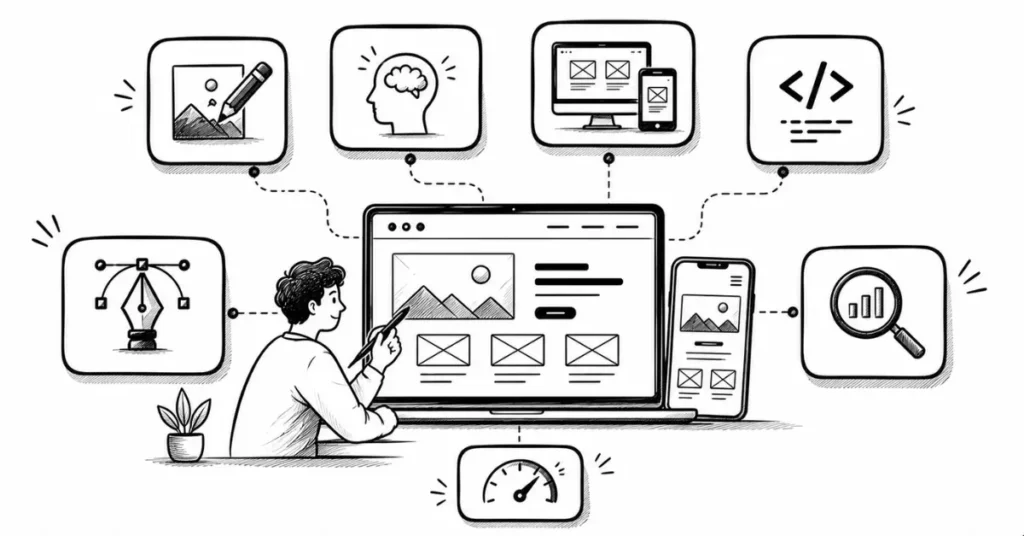
1. Visual Design Fundamentals
Before touching any web-specific skills, you need solid design basics:
Layout and Composition:
- Grid systems (12-column grids are standard in web design)
- Visual hierarchy (what users see first, second, third)
- White space and breathing room
- Balance and alignment
Color Theory for Web:
- Understanding web-safe colors
- Accessibility (color contrast ratios for readability)
- Brand colors adapted for screens
- Light mode vs dark mode considerations
Typography for Screens:
- Web-safe fonts vs custom fonts
- Font loading and performance
- Readability on different screen sizes
- Responsive typography (text that scales appropriately)
UI Design Patterns:
- Navigation systems (top nav, hamburger menus, sidebars)
- Buttons, forms, and input fields
- Cards, modals, and common components
- Call-to-action design
Indian context consideration: Many Indian websites need to work on slower internet connections and budget smartphones, so your designs must be lightweight and performance-conscious
2. User Experience (UX) Thinking
Web design isn’t just making things pretty—it’s solving user problems:
Information Architecture:
- Organizing content logically
- Creating intuitive navigation
- Structuring pages for easy scanning
- Minimizing clicks to important content
User Research Basics:
- Understanding target audience (demographics, tech literacy, device usage)
- Competitive analysis (what similar websites do)
- User personas (typical visitor profiles)
- Journey mapping (how users move through the site)
Accessibility:
- Designing for users with disabilities
- Screen reader compatibility
- Keyboard navigation
- Color contrast for vision impairments
- WCAG (Web Content Accessibility Guidelines) basics
Mobile-First Thinking:
In India, over 70% of internet users access the web primarily through mobile phones. Your designs must prioritize mobile experience.
3. Responsive Design (Non-Negotiable Skill)
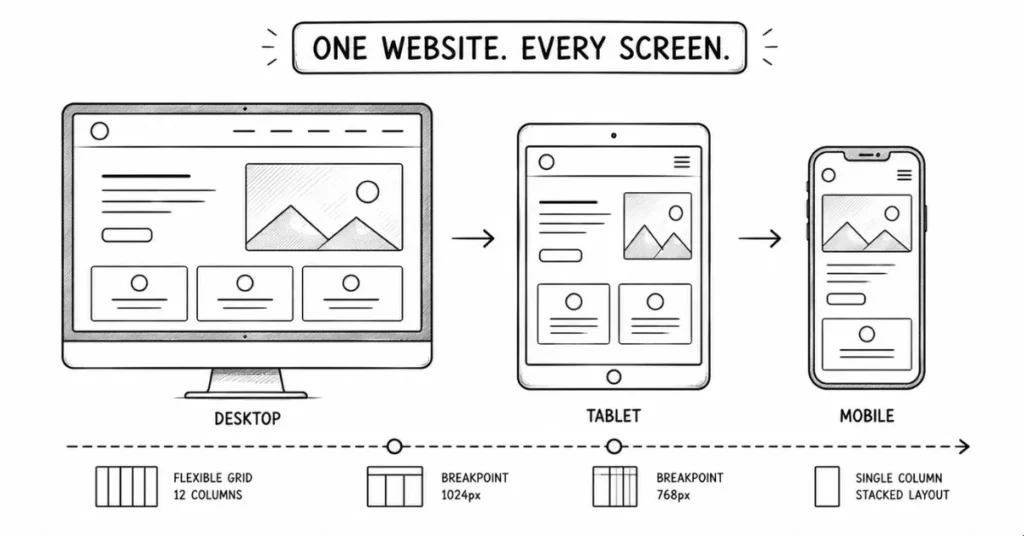
Responsive design means your website automatically adapts to different screen sizes desktop, tablet, mobile.
Key concepts:
Fluid Grids: Layouts use percentages instead of fixed pixels, so they flex with screen size.
Flexible Images: Images scale proportionally within their containers rather than breaking layouts.
Media Queries: CSS code that applies different styles based on screen size.
Breakpoints: Specific screen widths where layout changes (common breakpoints: 320px, 768px, 1024px, 1440px).
Mobile-First vs Desktop-First:
- Mobile-first: Design for small screens first, then enhance for larger screens
- Desktop-first: Design for large screens first, then adapt downward
Most modern web design follows mobile-first approach because it’s easier to expand a simple layout than simplify a complex one.
Why this matters for Indian designers: With diverse device usage (from ₹5,000 Android phones to premium laptops), responsive design ensures everyone gets a good experience.
4. HTML & CSS Basics (Your Foundation)
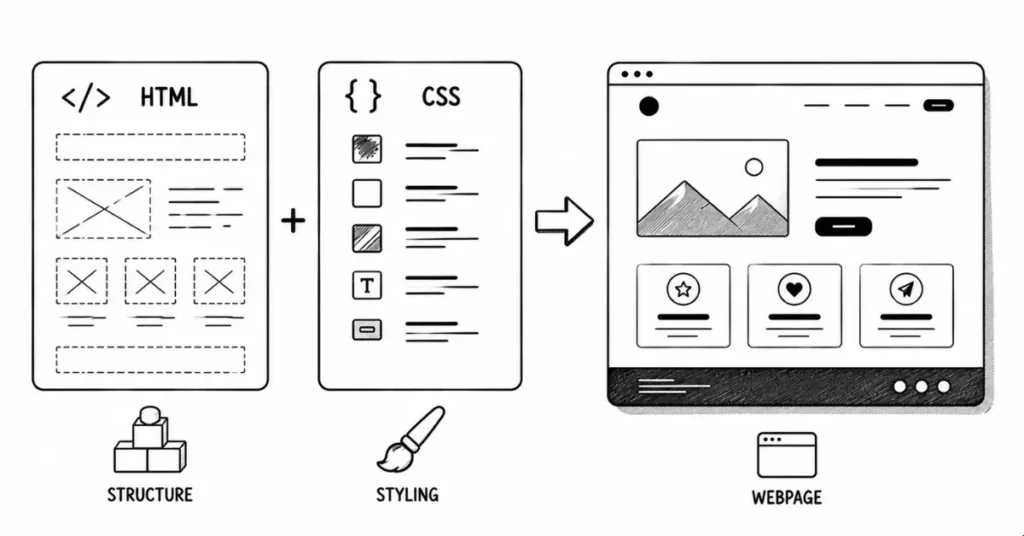
You don’t need to be a programmer, but knowing HTML and CSS is crucial for web designers.
HTML (HyperText Markup Language):
- Structure of web pages (headings, paragraphs, links, images)
- Semantic HTML (using proper tags for meaning)
- Forms and input elements
- Accessibility attributes
CSS (Cascading Style Sheets):
- Styling elements (colors, fonts, spacing)
- Layout techniques (Flexbox, Grid)
- Responsive design with media
- Animations and transitions
- Modern CSS features (variables, custom properties)
Skill level needed: You should be comfortable reading HTML/CSS, making basic changes, and understanding how your designs will be implemented. You don’t need to build complex web applications from scratch, but you should know enough to:
- Create basic landing pages
- Modify existing templates
- Communicate effectively with developers
- Understand technical constraints
Indian job market reality: Positions listing “₹4-5 LPA for web designers” often expect at least HTML/CSS knowledge. Pure visual designers without any code knowledge earn less or have fewer opportunities.
5. Design Tools Proficiency
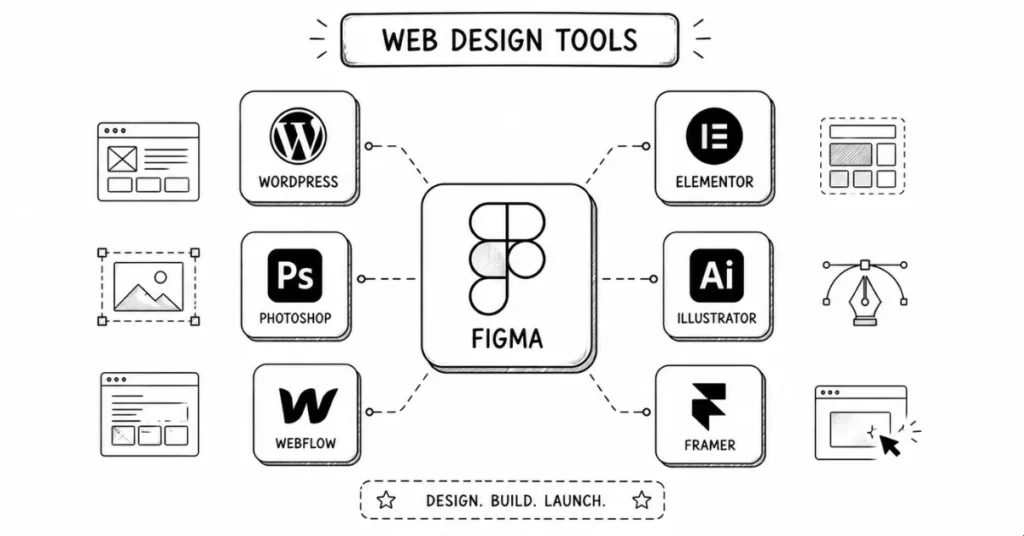
Primary Design Tools:
Figma (Industry Standard for Web Design):
- Create complete website designs
- Build design systems and components
- Prototype interactions
- Collaborate with developers (they can inspect your designs and extract CSS)
- Free for individuals
Adobe XD (Alternative):
- Similar to Figma but desktop-based
- Good for prototyping
- Integrates with Adobe ecosystem
Adobe Photoshop:
- Image editing and photo manipulation
- Creating graphics and visual elements
- Exporting assets for web (optimized images)
Adobe Illustrator:
- Creating icons, logos, and vector graphics
- SVG graphics for web
Supporting Tools:
WordPress + Elementor (You already use this!):
Many Indian businesses use WordPress, and designers who understand WordPress + page builders like Elementor are highly employable.
Webflow:
Visual web design tool that generates clean code. Growing in popularity among designers who want more control without deep coding.
Other Page Builders:
- Wix (simple, limited customization)
- Squarespace (beautiful templates, less flexible)
- Framer (design tool that publishes real websites)
6. Basic JavaScript Understanding (Not Essential But Valuable)
You don’t need to be a JavaScript developer, but understanding basics helps:
- What JavaScript does (interactivity, dynamic content)
- How it affects your designs (what’s possible, what’s complex)
- Basic interactions (dropdowns, sliders, animations)
- Libraries like jQuery (still common in many projects)
Many Indian job listings for “Web Designer with front-end skills” expect basic JavaScript familiarity.
7. SEO (Search Engine Optimization) Awareness
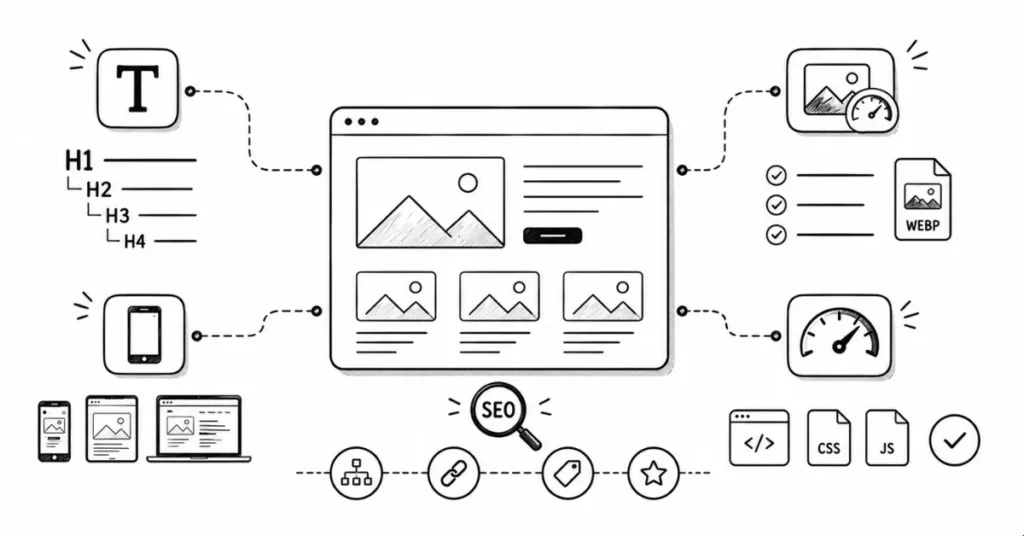
Good web design considers SEO from the start:
- Proper heading hierarchy (H1, H2, H3 structure)
- Image optimization (file sizes, alt text)
- Mobile-friendliness (Google prioritizes mobile-friendly sites)
- Page speed (fast loading times)
- Clean URL structures
- Semantic HTML for search engines
Why Indian designers need this: Many small businesses in India hire web designers to handle both design and basic SEO, making this a valuable skill combination
8. Basic Performance Optimization
Websites must load quickly, especially in India where internet speeds vary widely:
- Image compression and optimization
- Choosing appropriate file formats (WebP, SVG, optimized JPG/PNG)
- Lazy loading (images load only when needed)
- Minimizing resource use
- Understanding how design choices affect load time
Web Designer Career Paths and Salary in India
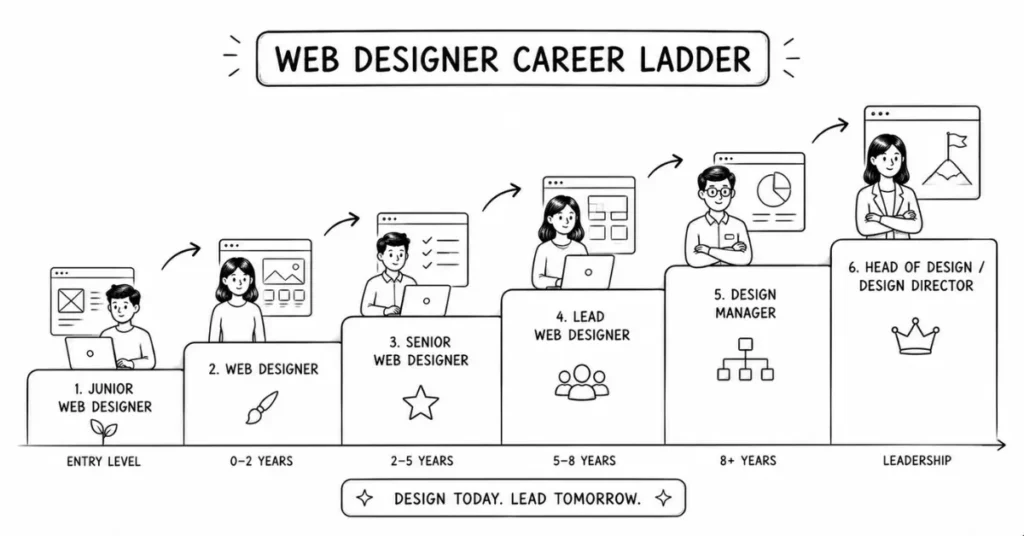
Entry-Level Web Designer (0-2 Years Experience)
Job Titles:
- Junior Web Designer
- Web Designer (Fresher)
- UI Designer
- Visual Designer
Salary Range:
- Metro cities (Bengaluru, Mumbai, Pune, Hyderabad): ₹2.5-5 LPA
- Tier-2 cities: ₹2-3.5 LPA
- Remote freelance monthly: ₹15,000-40,000
What you’ll do:
- Design website pages under senior guidance
- Create mockups and wireframes
- Update existing website designs
- Implement designs using page builders or basic HTML/CSS
- Learn company processes and design systems
Companies hiring:
- Digital marketing agencies
- Web development companies
- Startups with in-house design teams
- E-commerce businesses
- Freelance platforms
Mid-Level Web Designer (3-7 Years Experience)
Job Titles:
- Web Designer
- UI/UX Designer
- Front-End Developer (with strong design focus)
- Digital Experience
Salary Range:
- Metro cities: ₹5-10 LPA
- Tier-2 cities: ₹4-7 LPA
- Freelance monthly: ₹50,000-1,50,000
Skills typically expected:
- Proficient in Figma/Adobe XD
- Strong HTML/CSS skills
- Basic JavaScript knowledge
- Responsive design mastery
- UX research and testing experience
- Portfolio of completed websites
What you’ll do:
- Own complete website design projects
- Conduct user research and testing
- Create design systems
- Work directly with clients or product teams
- Mentor junior designers
- Sometimes handle front-end development
Senior-Level Web Designer (8+ Years Experience)
Job Titles:
- Senior Web Designer
- UI/UX Specialist
- Web Design Manager
- Creative Lead
- Creative Director
Salary Range:
- Senior Designer: ₹10-15 LPA
- Design Manager: ₹15-20 LPA
- Creative Director: ₹20-25+ LPA
- Freelance monthly: ₹1,50,000-4,00,000+
What you’ll do:
- Lead design strategy for products or clients
- Manage design teams
- Set design standards and systems
- Handle complex UX challenges
- Present to senior stakeholders
- Drive design vision and innovation
Skill-Based Salary Variations in India
According to recent data:
Skill | Average Annual Salary (INR) |
HTML/CSS | ₹2,50,000 – ₹5,00,000 |
JavaScript | ₹3,00,000 – ₹6,00,000 |
UI/UX Design | ₹4,00,000 – ₹8,00,000 |
Responsive Design | ₹3,50,000 – ₹7,00,000 |
Full Stack (Design + Dev) | ₹7,00,000 – ₹12,00,000 |
Key insight: Web designers who add front-end development skills (HTML, CSS, JavaScript) earn 30-50% more than pure visual designers.
Types of Web Design Work in India
1. Corporate Websites
hat you design:
- Business websites for companies (5-20 pages typically)
- Professional layouts with brand identity
- Service pages, about pages, contact forms
- Often CMS-based (WordPress, custom systems)
Typical clients: B2B companies, professional services, consultancies, established businesses
Rates:
- Simple 5-page site: ₹15,000-₹50,000
- Professional 10-15 page site: ₹50,000-₹1,50,000
- Complex corporate site with custom features: ₹1,50,000-₹5,00,000+
2. E-Commerce Websites
What you design:
- Online stores (Shopify, WooCommerce, custom platforms)
- Product pages and category layouts
- Shopping cart and checkout flows
- Mobile-optimized shopping experience
Typical clients: Retail businesses, D2C brands, online sellers
Rates:
- Basic Shopify/WooCommerce design: ₹25,000-₹80,000
- Custom e-commerce design: ₹80,000-₹3,00,000
- Large-scale marketplace design: ₹3,00,000-₹10,00,000+
3. Landing Pages and Marketing Sites
What you design:
- Single-page websites focused on conversions
- Lead generation pages
- Product launch pages
- Campaign-specific microsites
Typical clients: Marketing agencies, startups, SaaS companies
Rates:
- Single landing page: ₹5,000-₹25,000
- High-conversion landing page with A/B testing: ₹25,000-₹80,000
- Series of campaign pages: ₹50,000-₹1,50,000
4. Portfolio and Personal Websites
What you design:
- Professional portfolios for creatives
- Personal branding websites
- Small business owner websites
Typical clients: Freelancers, photographers, artists, consultants
Rates:
- Simple portfolio (template customization): ₹8,000-₹25,000
- Custom portfolio design: ₹25,000-₹70,000
5. WordPress Theme Customization
What you do:
- Customize existing WordPress themes
- Modify layouts using page builders (Elementor, Divi, Beaver Builder)
- Create child themes
- Design custom sections
Typical clients: Small businesses, bloggers, local businesses
Rates:
- Basic customization: ₹5,000-₹20,000
- Extensive customization with custom features: ₹20,000-₹60,000
6. Website Redesign Projects
What you do:
- Modernize outdated websites
- Improve user experience
- Update visual identity
- Optimize for mobile and performance
Typical clients: Established businesses with old websites
Rates:
- Small site redesign: ₹20,000-₹60,000
- Medium business site redesign: ₹60,000-₹1,50,000
- Large enterprise redesign: ₹1,50,000-₹5,00,000+
Web Design Career Roadmap: Beginner to Professional
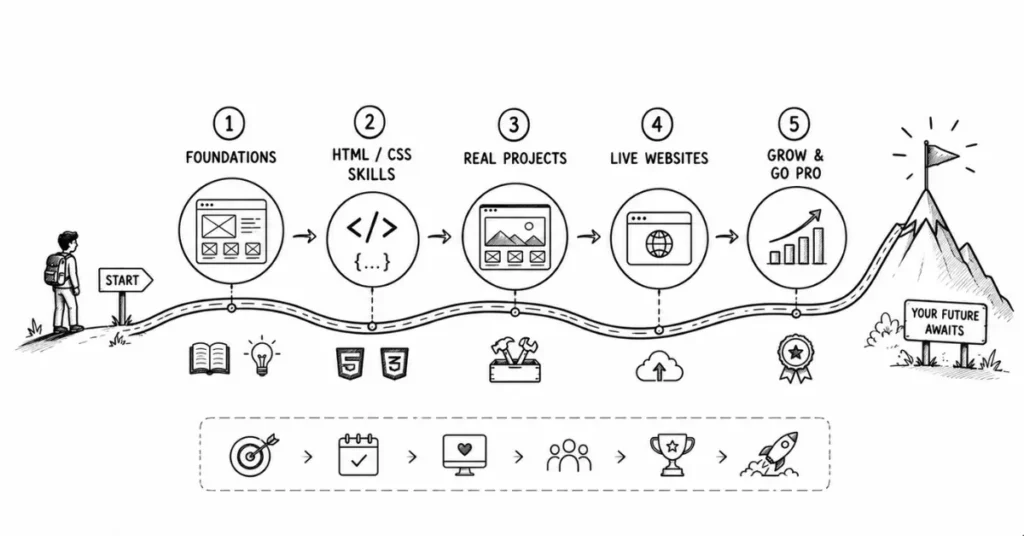
Phase 1: Foundations (Months 1-2)
Focus: Understanding web design basics and starting with no-code tools.
Learn:
- Design fundamentals (already covered if you completed earlier modules)
- How websites work (basic web concepts)
- Responsive design principles
- Figma for web design (frames, components, auto-layout)
Practice:
- Design 3-5 simple website mockups in Figma
- Recreate homepages of websites you admire
- Study website anatomy (header, nav, hero, content sections, footer)
- Create mobile and desktop versions of the same page
Tools to start:
- Figma (free)
- WordPress.com free account (explore how it works)
- Canva (for quick graphics)
Output: 5 website mockups showing different styles and purposes.
Phase 2: Adding Technical Skills (Months 3-4)
Focus: Learning HTML and CSS basics.
Learn:
- HTML structure and semantic tags
- CSS styling and layout
- Flexbox for responsive layouts
- CSS Grid for complex layouts
- Media queries for responsive
Resources:
- freeCodeCamp (free, comprehensive HTML/CSS course)
- W3Schools (reference and tutorials)
- YouTube: Traversy Media, Kevin Powell (CSS specialist)
- Scrimba (interactive coding tutorials)
Practice:
- Convert your Figma designs into HTML/CSS
- Build 5 simple web pages from scratch
- Create a responsive navigation menu
- Build a personal portfolio website
Output: Your own portfolio website (even if simple) hosted on GitHub Pages or Netlify (both free).
Phase 3: Real Projects and Specialization (Months 5-6)
Focus: Building complete websites and choosing your focus area.
Projects:
- Design and build 2-3 complete websites (fictional or for friends/family)
- One e-commerce site design (even practice)
- One business/corporate site
- One portfolio or creative site
Learn:
- WordPress basics and Elementor (high demand in India)
- Basic JavaScript interactions
- SEO fundamentals
- Performance optimization
Start freelancing:
- Create profiles on Fiverr, Upwork
- Reach out to local small businesses
- Offer discounted rates for your first 3-5 clients to build portfolio and testimonials
Output: Professional portfolio with 8-10 websites, including at least 3 live sites.
Phase 4: Professional Level (Months 7-12)
Focus: Establishing yourself as a professional web designer.
Activities:
- Take on regular client work (aim for 2-3 projects per month)
- Increase your rates gradually
- Specialize in a niche (e-commerce, SaaS, local businesses, creative portfolios)
- Learn advanced techniques (animations, advanced CSS, JavaScript libraries)
- Build a strong online presence (share work on Behance, Dribbble, Instagram, LinkedIn)
Consider:
- Getting WordPress certification
- Learning advanced tools (Webflow, Framer)
- Understanding back-end basics (how developers work)
- Project management skills
Goal: Earning ₹40,000-80,000 monthly from freelance or landing a full-time position at ₹4-6 LPA.
Building Your Web Design Portfolio
What to Include
8-12 complete website projects showing:
1.Homepage designs (the most important page)
2.Internal page designs (show you can handle full sites)
3.Mobile responsive versions (prove you understand responsive design)
4.Different industries (e-commerce, corporate, creative, tech)
5.Before/after redesigns (show improvement thinking)
How to Present Each Project
Case study format:
Project Overview:
- Client/fictional business description
- Project goals (What problem were you solving?)
- Your role (Solo designer? Part of team?)
Design Process:
- Research (competitive analysis, user research)
- Wireframes (show early planning)
- Visual design (final mockups)
- Responsive variations (mobile, tablet, desktop)
Technical Details:
- Tools used
- Technologies implemented
- Challenges faced and solved
Results:
- Live website link (if available)
- Client feedback/testimonial
- Metrics (if accessible): traffic increase, conversion improvements, etc.
If You Don't Have Client Work Yet
Create realistic fictional projects:
- Local restaurant website redesign
- E-commerce store for Indian handicrafts
- Portfolio site for a photographer
- Booking website for a yoga studio
- Landing page for a mobile app
Make them feel real:
- Use actual content (not just lorem ipsum)
- Create complete designs (not just homepage)
- Show mobile versions
- Write detailed case studies
Many successful web designers built their portfolios entirely with self-initiated projects before getting clients.
Where to Showcase
Personal website: Your own domain (yourname.com or yourname.in) shows professionalism and showcases your web design skills.
Behance: Upload detailed case studies with multiple images.
Dribbble: Share individual screens and design details.
LinkedIn: Post project updates and engage with the design community.
Instagram: Share your work visually with design process posts.
Common Mistakes Beginners Make
1. Ignoring Mobile Design
The mistake: Designing only for desktop and treating mobile as an afterthought.
Why it’s wrong: In India, most users access websites on mobile first. A beautiful desktop site that breaks on mobile is a failed project.
The fix: Always design mobile version first or simultaneously with desktop. Test on actual devices, not just emulators.
2. Poor Typography Choices
The mistake: Using too many fonts, decorative fonts for body text, or poor size hierarchy.
Why it’s wrong: Makes websites hard to read and unprofessional.
The fix: Stick to 2-3 fonts maximum. Use web-safe fonts or Google Fonts. Ensure text is large enough (minimum 16px for body text).
3. Ignoring Performance
The mistake: Using huge unoptimized images, adding too many animations, or overloading pages with content.
Why it’s wrong: Slow-loading websites frustrate users and hurt SEO. In India, where internet speeds vary, this is critical
The fix: Compress all images before uploading. Use modern formats (WebP). Test site speed using Google PageSpeed Insights.
4. Not Testing Across Browsers and Devices
The mistake: Only testing in Chrome on your laptop.
Why it’s wrong: Websites can look and function differently on Safari, Firefox, mobile browsers, and different devices.
The fix: Test on multiple browsers and actual devices. Use tools like BrowserStack for comprehensive testing.
5. Poor Color Contrast
The mistake: Light gray text on white backgrounds, or color combinations that are hard to read.
Why it’s wrong: Makes content inaccessible, especially for users with vision impairments.
The fix: Use contrast checking tools (WebAIM Contrast Checker). Aim for at least 4.5:1 contrast ratio for normal text.
6. Forgetting Call-to-Actions (CTAs)
The mistake: Beautiful designs without clear next steps for users.
Why it’s wrong: Websites exist to accomplish goals (sales, leads, information). Weak CTAs mean failed conversions.
The fix: Every page should have a clear primary action. Make buttons stand out. Use action-oriented text (“Get Started,” “Download Now,” not just “Submit”).
7. Not Using a Design System
The mistake: Creating every element from scratch with inconsistent spacing, colors, and styles.
Why it’s wrong: Creates visual inconsistency and makes future updates difficult.
The fix: Create reusable components in Figma. Define spacing scale, color palette, and typography system before starting detailed design.
Your Next Steps: Action Plan
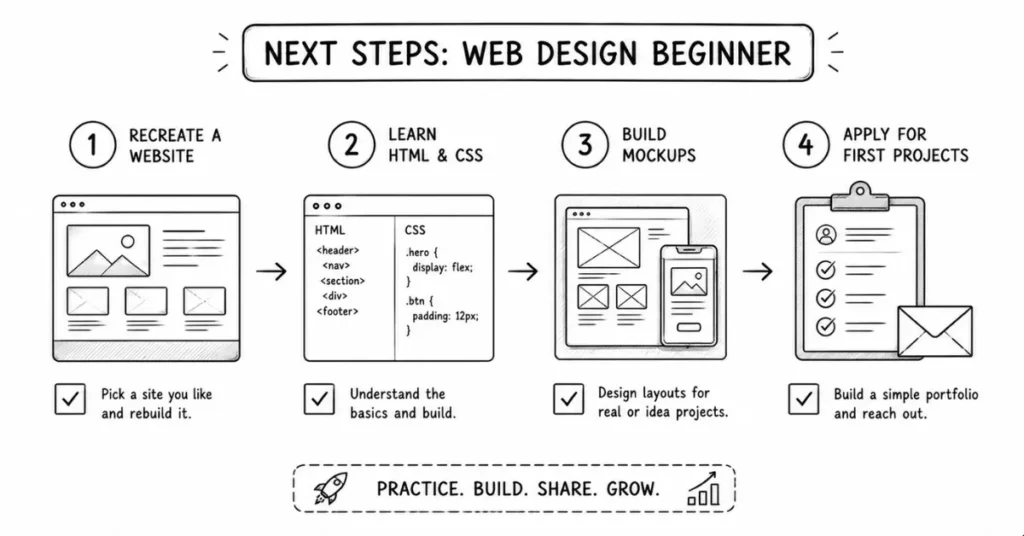
This Week
- Choose one website to recreate in Figma (just the homepage)
- Sign up for freeCodeCamp and complete the first 10 HTML lessons
- Study 5 Indian website designs (Zomato, Nykaa, CRED, etc.)—analyze what works
- Create a simple one-page website mockup in Figma
7. Not Using a Design System
- Complete HTML and CSS basics course on freeCodeCamp
- Design 3 complete website mockups (different industries)
- Build your first simple HTML/CSS website
- Create a Behance account and upload your first project
Within 3 Months
- Design and code 5 complete websites
- Learn responsive design
- Start learning WordPress + Elementor basics
- Reach out to 5 local businesses offering web design services
- Land your first paid project (even ₹5,000-10,000)
Within 6 Months
- Have a portfolio of 10 websites
- Be comfortable with HTML, CSS, and basic JavaScript
- Understand WordPress and one page builder deeply
- Build consistent freelance income (₹30,000-50,000 monthly)
- Or apply for full-time web designer positions (₹3-5 LPA)
Resources for Learning Web Design
Free Learning Platforms
freeCodeCamp: Comprehensive web development curriculum, completely free.
W3Schools: Reference guides and tutorials for HTML, CSS, JavaScript.
Scrimba: Interactive coding tutorials, learn by doing.
YouTube Channels:
- Traversy Media (web development tutorials)
- Kevin Powell (CSS specialist)
- DesignCourse (web design and UI/UX)
- The Net Ninja (web development for beginners)
Paid Courses (Worth Investment)
Udemy courses (often on sale for ₹500-1,000):
- “The Complete Web Developer Course”
- “Modern HTML & CSS From The Beginning”
- “JavaScript – The Complete Guide”
Frontend Masters: Professional-level courses (subscription-based).
Coursera: Courses from universities (can audit for free).
Design Inspiration
Awwwards: Showcases award-winning web design.
Dribbble: UI/UX design inspiration.
Behance: Complete project case studies.
Mobbin: Mobile and web UI design patterns.
Land-book: Landing page design inspiration.
Tools and Resources
Google Fonts: Free web fonts.
Unsplash/Pexels: Free stock photos.
Flaticon: Free icons (with attribution).
Coolors: Color palette generator.
Can I Use: Check browser compatibility for CSS features.
Final Thoughts: Your Web Design Journey Starts Now
Web design sits at the perfect intersection of creativity and technology. You get to solve problems visually while working with code and systems. In India’s rapidly digitalizing economy, this skill set opens doors across industries.
The best part? You don’t need a computer science degree. You don’t need expensive software (Figma is free). You don’t need to be in a metro city (remote work is common). What you need is curiosity, consistent practice, and willingness to learn continuously.
Start simple. Design one webpage this week. Code one simple HTML page next week. Build gradually. Every professional web designer you admire started exactly where you are—knowing nothing, feeling overwhelmed, wondering if they could do this.
They became successful because they started and stayed consistent. That can be you.
What website will you design today?