
UX/UI Design Career Guide : Skills, Salary & Growth Path
Table of Contents
Introduction: Why UX/UI Design Is Booming in India
UX/UI design has become one of the most in-demand creative-tech careers in India. Startups, IT companies, product-based firms, and even traditional businesses going digital now need designers who can make apps and websites simple, beautiful, and easy to use.
If you’ve ever felt frustrated using a confusing app, that’s a UX problem. If you’ve ever loved how smooth and clean a product feels, that’s good UX and UI working together. The best part? You don’t need to be a hardcore coder to enter this field. You need design thinking, empathy, visual sense, and comfort with digital tools.
This guide will walk you through what UX and UI actually mean, the skills and tools you need, typical salaries in India, and a clear roadmap to move from beginner to job-ready.
UX vs UI: Simple Explanation in Layman’s Language
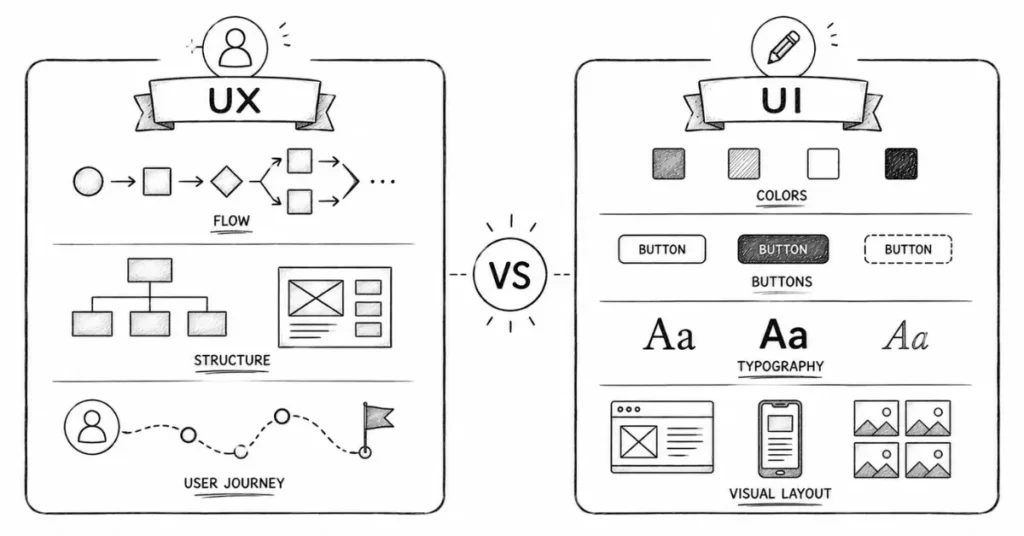
People often say “UX/UI” together as if they’re the same job, but they focus on different things.
What Is UX (User Experience) Design?
UX is about the overall experience a user has with a product (website, app, software).
Think of UX like planning a restaurant:
- How easy is it to find the entrance?
- Is the menu clear?
- Do you get your food on time?
- Is the whole experience smooth?
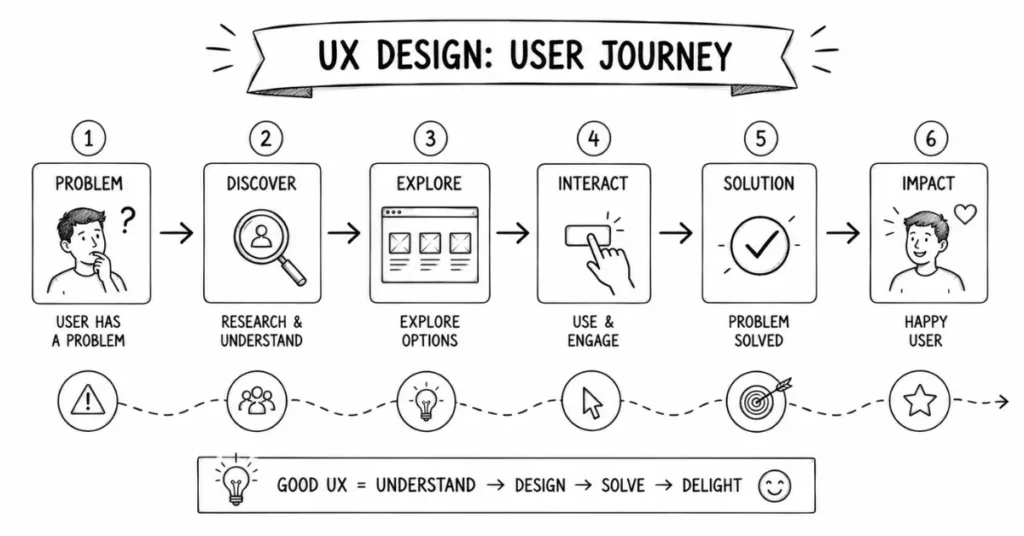
In digital products, UX designers:
- Understand user needs and pain points.
- Plan the flow: which screen comes first, what happens after a button click.
- Create wireframes (basic black-and-white layouts).
- Test with real users and fix problems.
UX is about function, flow, and feeling.
What Is UI (User Interface) Design?
UI is about how the product looks and how the user interacts with it visually.
Continuing the restaurant example, UI is:
- The decor and colors.
- How the menu looks.
- The lighting and table setup.
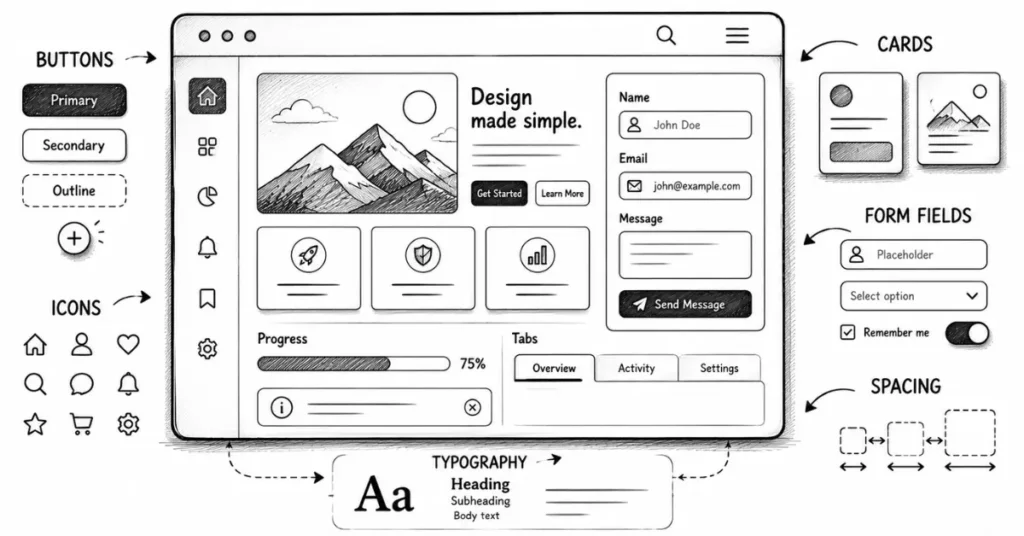
In apps and websites, UI designers:
- Choose colors, fonts, and spacing.
- Design buttons, cards, forms, and icons.
- Make sure everything looks clean, consistent, and on-brand.
- Prepare final designs for developers.
UI is about visuals, style, and details.
Do Companies in India Expect One Person to Do Both?
In many Indian startups and smaller companies, one person is hired as a “UX/UI Designer” and handles both. In bigger product companies, the roles may be split: UX Designer, UI Designer, Product Designer, Interaction Designer, etc.
As a beginner, you should understand both but you can choose to lean slightly more towards UX (research, flows) or UI (visual design).
What Does a UX/UI Designer Actually Do Day-to-Day?
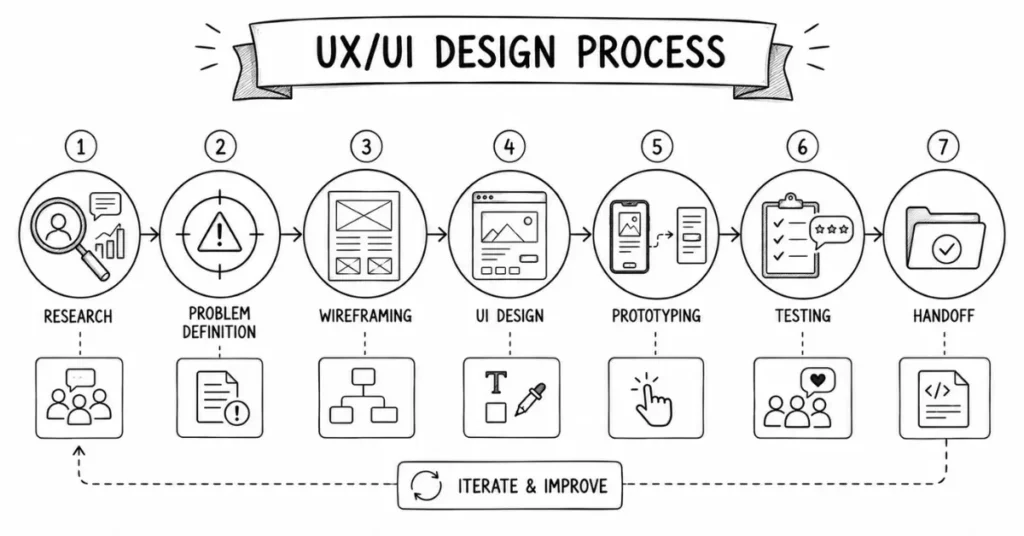
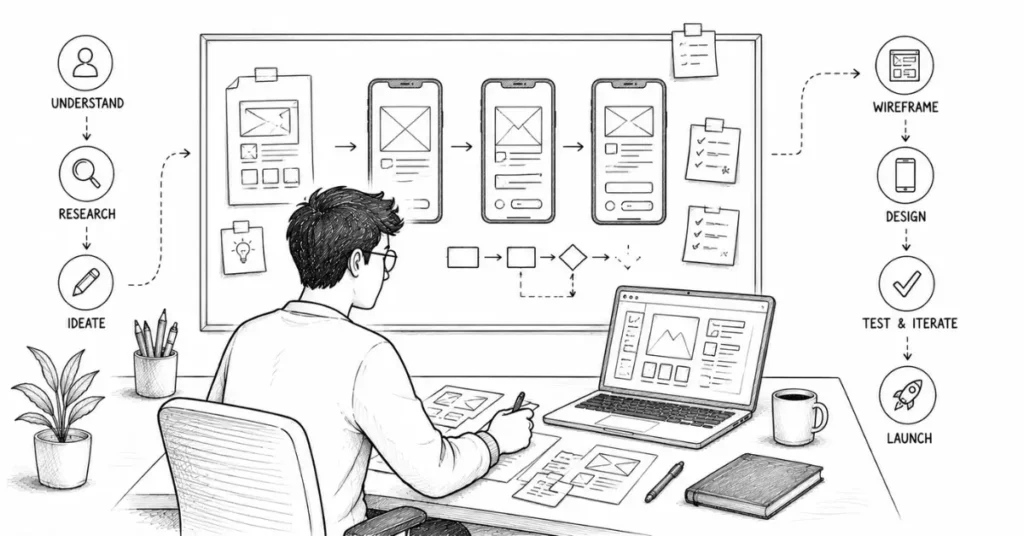
Here’s a simplified flow of a typical project:
- Understand the problem
- Talk to stakeholders (founders, product managers, marketing).
- Understand business goals and user goals.
- Example: “We want more people to complete checkout on our app.”
- Research users
- Interview real or potential users.
- Study how people currently use the product.
- Look at competitors or similar products.
- Define the problem clearly
- Convert messy inputs into a clear statement.
- Example: “Users drop off at the address screen because it’s too long and confusing.”
- Sketch and plan user flows
- Draw simple boxes with arrows showing how users move through the app.
- Focus on steps, not visuals.
- Create wireframes
- Make low-fidelity (black-and-white) screens with rough placement of elements.
- Decide what goes where.
- Design the UI
- Add colors, fonts, icons, spacing, and visual hierarchy.
- Apply a design system or create one (consistent styles and components).
- Prototype the experience
- Make a clickable version of the design (without code) to simulate real use.
- Share with stakeholders and users for feedback.
- Test and iterate
- Observe how users interact with the prototype.
- Fix confusion points and improve.
- Handoff to developers
- Share design files, specs, and assets.
- Clarify interactions, spacing, and behaviors.
- Post-launch improvements
- Track metrics (conversion, drop-off, time on task).
- Keep improving based on data.
You won’t do all of this from day one as a fresher, but this is where you’re headed.
Core Skills You Need for a UX/UI Design Career
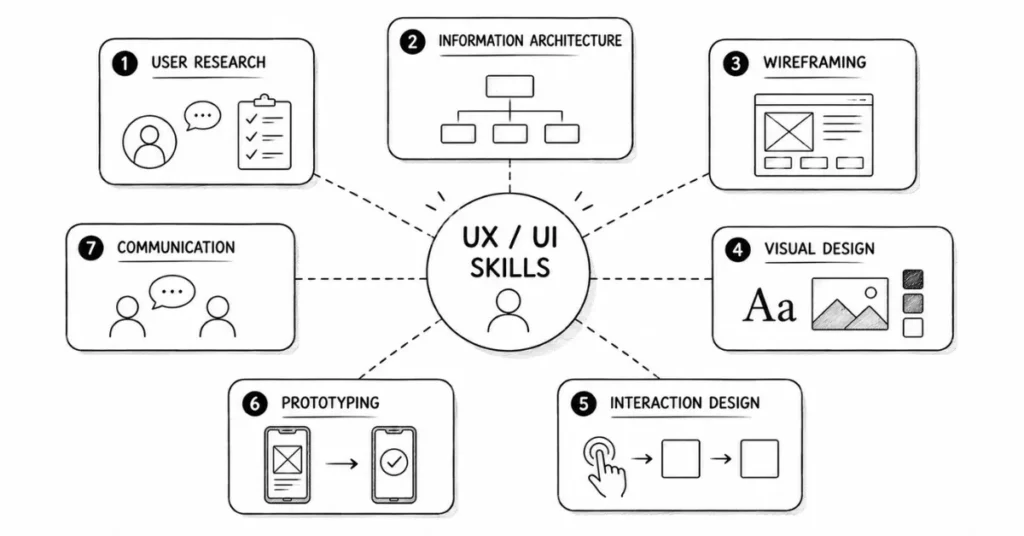
1. User Empathy and Research Skills (UX)
You must understand people how they think, what frustrates them, and what they need.
Key UX skills:
- User interviews: asking open-ended questions without leading users.
- Surveys: asking the right questions and interpreting responses.
- Competitor analysis: seeing what others do well or badly.
Creating personas: fictional profiles of typical users (e.g., “Ravi, 21, engineering student in Bengaluru using an ed-tech app on low-budget Android phone”).
2. Information Architecture and User Flows
This is about organizing information and planning how users move through a product.
- Structuring navigation (home, categories, filters, etc.).
- Mapping user journeys: from “landing on homepage” to “successful checkout.”
- Minimizing steps and confusion.
If you’ve ever used an app where you felt lost, that’s poor information architecture. Your job is to prevent that.
3. Wireframing and Low-Fidelity Design
Before beautifying screens, you must think in rough flows.
- Use boxes, lines, and simple shapes to plan layouts.
- Focus on what appears where and in what order.
- Tools: pen & paper, whiteboard, or simple wireframing in Figma/Adobe XD.
Think of this as the blueprint of a house before interior design starts.
4. Visual Design (UI) Fundamentals
To create beautiful, usable screens, you must know:
- Typography: choosing fonts, sizes, and spacing that are readable and on-brand.
- Color: using palettes that support meaning (error = red, success = green, etc.).
- Layout: grids, spacing, alignment, and hierarchy.
- States: how elements look when normal, hover, pressed, disabled, etc.
Good UI feels simple, clean, and consistent—not “overdesigned.”
5. Interaction Design and Microinteractions
This is about what happens when users interact with elements:
- Button hover states.
- Loading animations.
- Error messages and validation.
- Transitions between screens.
These small details make experiences feel “smooth” and “premium.”
6. Prototyping and Testing
You must be able to:
- Build interactive prototypes (click-through flows) in Figma/Adobe XD.
- Send them to users or stakeholders.
- Watch how people actually interact and note where they struggle.
- Iterate quickly without ego.
This testing mindset is rare and very valuable in India, where many products are still built on assumptions.
7. Communication and Collaboration
In India, UX/UI designers often work with:
- Product managers.
- Developers (front-end and back-end).
- Founders or business teams.
- Marketing and data teams.
You’ll need to:
- Present your work clearly.
- Explain design decisions in simple terms.
- Defend good design while being open to feedback.
Write clear documentation or notes.
Tools You Need to Learn (Realistically)
You don’t need 10 tools. Start with a focused set.
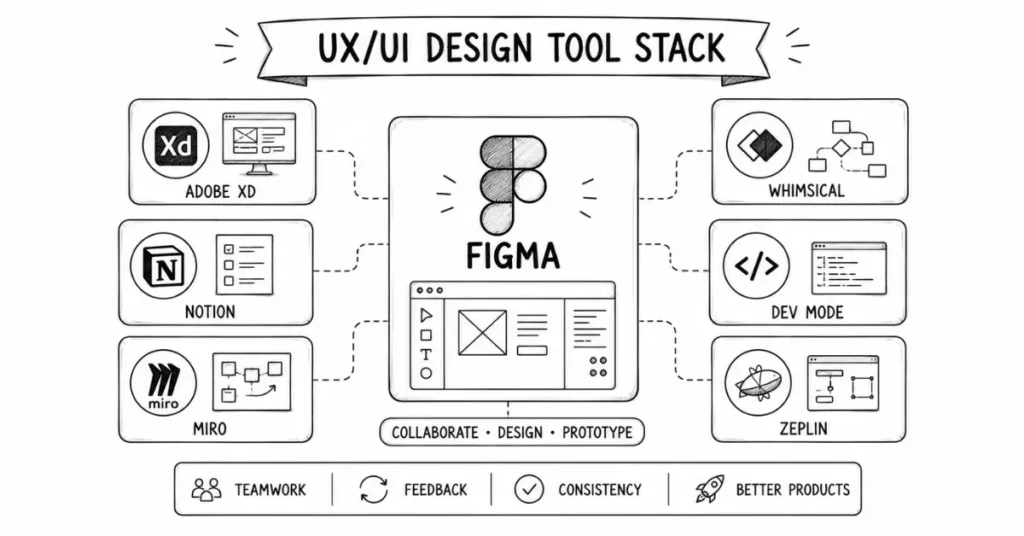
1. Figma (Highly Recommended)
Figma has become the default tool for UI and UX design:
- Free for individuals and small teams.
- Cloud-based: works on modest laptops.
- Great for wireframes, UI layouts, prototypes, and design systems.
- Real-time collaboration with teammates and developers.
If you master only one tool as a beginner UX/UI designer, let it be Figma.
2. Adobe XD (Alternative)
Some companies still use Adobe XD:
- Similar purpose as Figma: UI, prototypes, flows.
- Integrates well in Adobe ecosystems.
- Good to know if a specific company requires it.
3. Supporting Tools
You don’t have to master all at once, but they’re useful:
- Notion/Google Docs: For documenting research, user flows, and product requirements.
- Miro/Whimsical: For mind maps, user journey mapping, and flow charts.
- Zeplin or Figma Inspect: For developer handoff (viewing specs, spacing, and assets).
Basic HTML/CSS awareness (optional but helpful): So you understand what’s easy or hard to build.
Typical UX/UI Salaries and Roles in India (Indicative)
Exact numbers vary by city, company, and your portfolio strength, but a rough pattern:
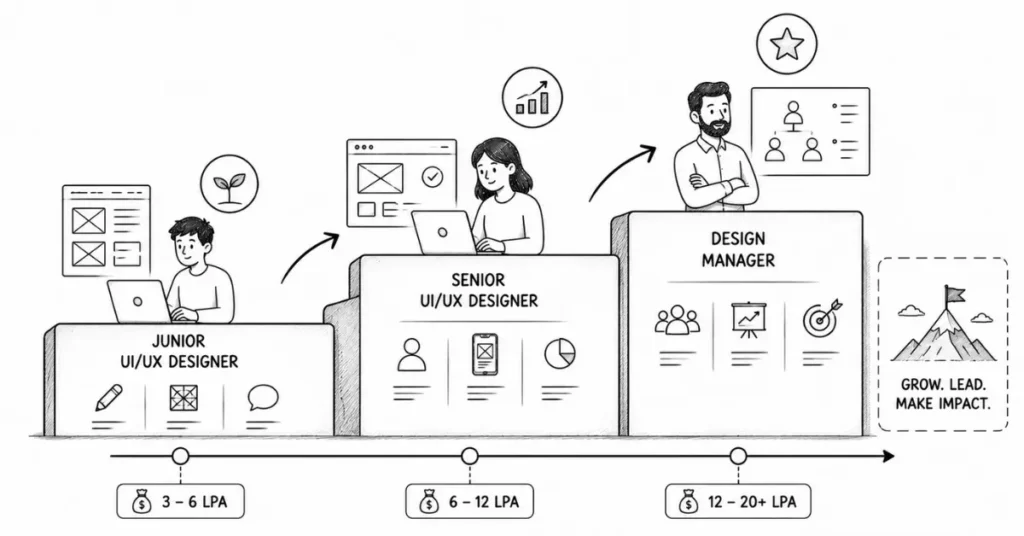
Entry Level (0–2 Years Experience)
- Job titles: Junior UX Designer, Junior UI Designer, UX/UI Designer (Fresher).
- Salary range (metros like Bengaluru, Mumbai, Hyderabad, Gurgaon, Pune): ~₹3 LPA to ₹7 LPA.
- In smaller cities or early-stage startups: ~₹2.5 LPA to ₹5 LPA.
- At this stage, companies mainly care about your portfolio and mindset, not your degree
Mid Level (3–5 Years Experience)
- Job titles: UX Designer, UI Designer, Product Designer.
- Salary range: ~₹7 LPA to ₹15 LPA (higher in top product companies, funded startups, and MNCs).
- You’ll handle bigger features, own modules, and mentor juniors.
Senior Level (5–9 Years Experience)
- Job titles: Senior Product Designer, Senior UX Designer, Lead Designer.
- Salary range: ~₹15 LPA to ₹25 LPA+, depending on impact and company.
- You’ll own large parts of the product and be part of key decisions.
Leadership (10+ Years Experience)
- Job titles: Design Manager, Head of Design, Director of UX.
- Salary range: can exceed ₹30 LPA+ in strong product companies.
- You’ll manage teams, shape design culture, and align design with business.
Freelance UX/UI designer rates for experienced professionals can go from ₹1,000–₹4,000+ per hour or project-based fees in lakhs for full product design, especially when working with international clients.
UX/UI Career Roadmap: From Beginner to Job-Ready
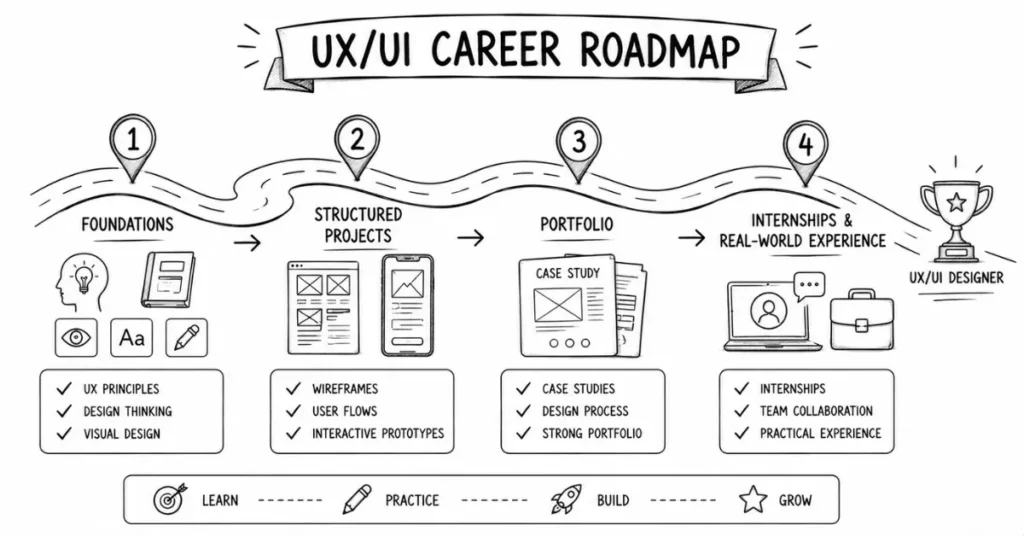
Phase 1: Foundations (0–2 Months)
Focus: Understanding UX/UI basics and thinking like a designer.
- Learn what UX and UI are (not just definitions, but real examples).
- Study 10–20 popular apps you use daily:
- Note what feels smooth and what is annoying.
- Sketch their flows (how many steps to complete a task?).
- Note what feels smooth and what is annoying.
- Watch beginner playlists on:
- UX fundamentals (user research, personas, journeys).
- UI fundamentals (typography, color, spacing, components).
- UX fundamentals (user research, personas, journeys).
- Start with Figma basics:
- Frames, shapes, text.
- Auto-layout.
- Components and variants (buttons, inputs, cards).
- Frames, shapes, text.
Output goal:
- A few simple screen designs (e.g., login page, profile page, home screen).
1–2 basic flows (e.g., sign-up flow, add-to-cart flow).
Phase 2: Structured Projects (2–4 Months)
Focus: Doing complete mini-projects from problem to prototype.
Pick 2–3 project ideas such as:
- A student-focused expense tracker app.
- A city-based food discovery app (e.g., “Best Biryani in Hyderabad”).
- A redesigned experience for a government service (e.g., booking a train ticket, paying electricity bill).
For each project, do:
- Problem statement:
- “Students struggle to track small daily expenses and end up overspending.”
- “Students struggle to track small daily expenses and end up overspending.”
- Quick user research (even friends/family):
- Ask: “How do you currently track expenses?”
- “What frustrates you about current apps?”
- Note patterns.
- Ask: “How do you currently track expenses?”
- Personas and simple journey:
- Who is using it?
- What are their goals?
- What does their ideal flow look like?
- Who is using it?
- User flows:
- Draw basic boxes showing screen sequence.
- Draw basic boxes showing screen sequence.
- Wireframes:
- Sketch layouts in low fidelity first.
- Sketch layouts in low fidelity first.
- UI design:
- Apply colors, grids, typography, and components in Figma.
- Apply colors, grids, typography, and components in Figma.
- Prototype:
- Make a clickable version.
- Make a clickable version.
- Light testing:
- Show to 3–5 people.
- Watch where they get confused.
- Fix accordingly.
- Show to 3–5 people.
Output goal:
2–3 complete UX/UI case studies with problem–process–solution.
Phase 3: Portfolio and Internships (4–6 Months)
Focus: Turning your work into professional-looking case studies.
Your portfolio should include:
- 3–5 strong case studies, not just pretty screens.
- Each case study should show:
- Context (who, what, why).
- Research insights (even small-scale).
- Flows and wireframes.
- Final UI screens.
- Reflections (what you’d improve next).
- Context (who, what, why).
Where to publish:
- Personal website (ideal, even on a basic builder).
- Behance with well-structured projects.
- LinkedIn: share short breakdowns and visuals.
Start applying for:
- Internships at startups, product companies, or agencies.
- Junior UX/UI roles.
- Freelance gigs (via LinkedIn, local contacts, or platforms).
At this stage, your portfolio matters far more than your degree.
Portfolio Tips Specific to UX/UI
- Show thinking, not only Dribbble-style shots
Recruiters want to see how you arrived at a design, not just the final UI.
- Quality over quantity
3 solid case studies are better than 10 superficial ones.
- Context is king
Always answer: Who is this for? What problem does it solve? On which platform (Android, iOS, web)?
- Use real content when possible
Avoid too much lorem ipsum. Use realistic text, labels, and data. - Be honest
If it’s a self-initiated case study, say so. That’s completely fine as a beginner.
Common Mistakes Beginners Make in UX/UI Design
- Jumping straight into Dribbble-style UI without understanding users or flows.
- Overcomplicating screens with too many elements.
- Ignoring accessibility (tiny fonts, low contrast, tap targets too small).
- Copying other designs blindly without understanding why they work.
- Making case studies that are only screen galleries with no story.
- Thinking “more animation = better experience” (often the opposite).
How Non-Technical or Non-Design Background Students Can Transition
Even if you’re from B.Com, BBA, BA, B.Sc, or a completely non-design field, UX/UI is still accessible if you:
- Enjoy problem-solving and creativity.
- Are comfortable using a laptop and learning new tools.
- Are willing to practice regularly and think from the user’s point of view.
Many successful Indian UX/UI designers started in engineering, marketing, architecture, or even BPOs. What helped them:
- A strong, practical portfolio.
- Good communication skills.
- Willingness to learn continuously.
Your Next Steps (Action Plan)
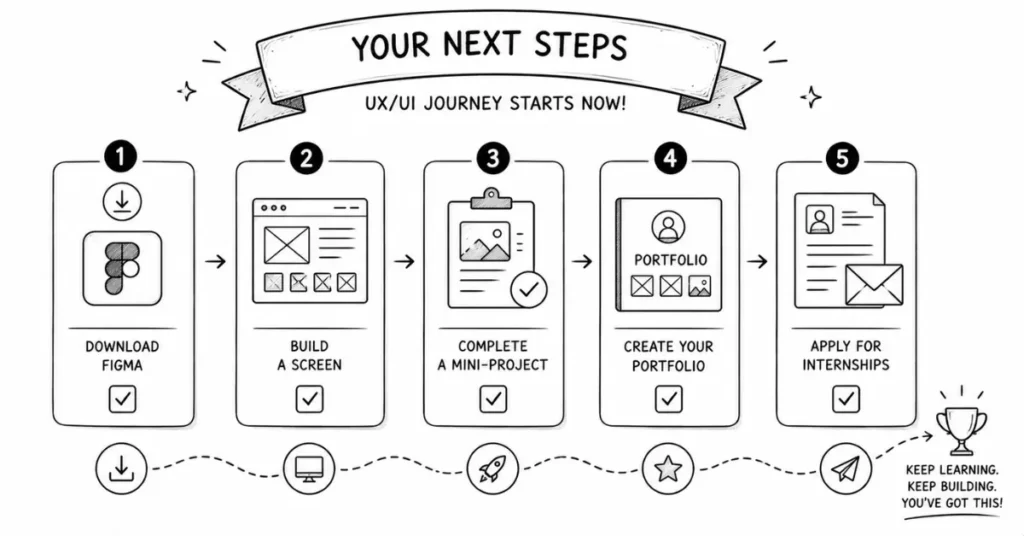
This Week:
- Download and set up Figma (free).
- Design a simple login and sign-up screen.
- Recreate the UI of one app screen you use daily (for learning only).
- Watch a beginner-friendly UX/UI playlist and follow along.
This Month:
- Complete 1 small end-to-end mini-project (problem to prototype).
- Study 10 apps in detail: note what you like and dislike.
- Read 3–5 well-written UX case studies online and copy their structure.
Within 3–6 Months:
- Build 3–5 solid case studies.
- Create a portfolio on Behance or your own site.
- Apply for internships and junior roles.
Start networking with UX/UI designers on LinkedIn.