
Profile Updates & Maintenance

Table of Contents
Here’s the truth about LinkedIn: stale profiles get buried.
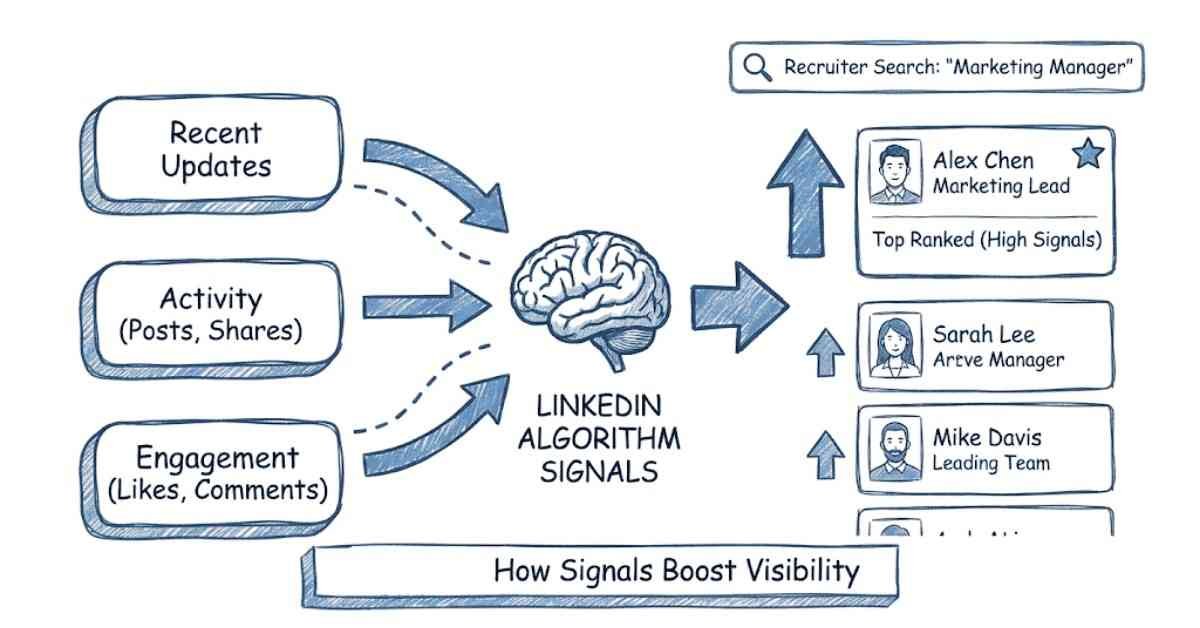
LinkedIn’s algorithm prioritizes recently updated, active profiles. A profile that hasn’t been touched in 6 months signals that you’re not actively engaged or looking for opportunities.
Think of your LinkedIn profile like a garden. If you don’t water it regularly, it withers.
“Want More Profile Optimization Tips? Explore Career Resources on Frontlines Media
Why Profile Maintenance Matters
LinkedIn Rewards Activity:
- Profiles updated in the last month appear higher in recruiter searches
- Active profiles (with posts/comments) get 5x more profile views
- Updated profiles signal you’re current and growing
Recruiter Psychology:
- “This person hasn’t updated in 2 years—probably not serious about their career”
- “Updated profile last week—actively looking or growing”
- “Regular posts/engagement—thought leader in their field”
Your Competitive Advantage:
If two candidates have similar qualifications, the one with a recently updated profile gets found first.

The 90-Day Maintenance Schedule
The sweet spot for profile updates is every 90 days (quarterly). This keeps you visible without requiring constant work.
Q1 (Jan-Mar) Update Focus:
- New Year’s Goals & Professional Growth
- Recent certifications or courses completed
- Q4 achievements from previous year
- New Year intentions (what you’re learning, where you’re heading)
Q2 (Apr-Jun) Update Focus:
- Mid-year achievements
- Updated skills (summer internships, courses)
- Seasonal hiring season (many companies hire for fall starts)
- Summer learning goals
Q3 (Jul-Sep) Update Focus:
- Summer project completions
- Internship/project experience from summer
- Back-to-school season (relevant if your target audience is students)
- Preparation for fall hiring rush
Q4 (Oct-Dec) Update Focus:
- Year-end achievements and results
- Certifications completed
- Portfolio updates
- Year-end reflections and growth

The 90-Day Maintenance Checklist
Do this every 90 days (takes 2-3 hours):
Headline & About (30 minutes)
- Is your headline still accurate? Update if your role/focus changed
- Are your keywords still relevant? Add trending keywords if applicable
- Does your About section reflect current goals? Update intent if needed
- Any typos or outdated information? Fix them
Work Experience (30 minutes)
- Add new achievements from the past 90 days to your current role
- Update job description if you took on new responsibilities
- Add metrics/results from recent projects
- Link any new media (case studies, presentations)
Skills (15 minutes)
- Did you learn any new skills? Add them
- Did your skill priorities change? Reorder top skills if needed
- Any skills you’re less focused on? Move them down
- Get 2-3 new endorsements for your top skills
Featured Content (20 minutes)
- Replace old featured items with new achievements
- Add certifications you completed in the last 90 days
- Update project links or portfolio items
- Remove anything outdated
Profile Photo & Banner (10 minutes)
- Is your photo current (within last 6-12 months)? Consider updating if you’ve changed appearance
- Does your banner still represent your brand? Update if needed
- Check photo quality—is it still professional?
Activity Check (20 minutes)
- When was your last profile view? Track this
- How many recruiter messages did you get last quarter? Analyze trends
- Did your engagement (posts/comments) increase or decrease? Plan improvements
Recommendations & Endorsements (15 minutes)
- Do you have any new recommendations to request? Ask 2-3 people
- Are your skills section endorsements current? Remove weak endorsements if needed
- Have any connections endorsed you recently? Return the favor
Open to Work (5 minutes)
- Is “Open to Work” still turned on? Update it if your job search status changed
- Is your custom message still relevant? Refresh it
Are your job preferences still accurate? Update target roles if needed
“Strengthen Your Profile Updates — Build In-Demand, Job-Ready Skills Today →”
Monthly Micro-Maintenance (20 minutes/month)
Between quarterly reviews, do light maintenance monthly:
Weekly (5 minutes):
- Share or comment on 2-3 posts in your field
- Engage with your network’s content
Bi-weekly (10 minutes):
- Review profile views and recruiter messages
- Note what’s working (what content/achievements get attention)
Monthly (20 minutes):
- Add one new achievement or update to work experience
- Endorse 2-3 connections for skills
- Reach out to 1-2 people for recommendations
This keeps your profile active without requiring major overhauls.
When to Update Your Profile (Beyond 90 Days)
Update immediately when these life events happen:
Career Changes:
- New job → Update headline, current role, skills
- Promotion → Update title, responsibilities, achievements
- Job loss → Update status (“Open to Work”), headline intent
- Career pivot → Update headline and About to reflect new direction
Learning Milestones:
- Certification completed → Add to skills, featured content, About
- Course completed → Link certificate in featured section
- Bootcamp graduation → Update with new skills, projects, About
- Degree completion → Update education, headline
Achievement Moments:
- Major project completion → Add to work experience with results
- Award or recognition → Add to featured content, About
- Published article or portfolio piece → Feature it
- Speaking engagement → Add with link or video
Profile Issues:
- Typos discovered → Fix immediately (kills credibility)
- Outdated information → Update right away
- Lower engagement than expected → Audit and refresh
Seasonal/Timely Updates:
- Hiring season approaching → Refresh and emphasize relevant skills
- Industry trend emerging → Add trending keywords
Personal brand shift → Update all sections to reflect new positioning
Common Profile Update Mistakes
Mistake 1: Massive Overhauls Too Infrequently
❌ Don’t touch profile for 1 year, then overhaul everything at once
✅ Small, consistent updates every 3 months
Why? Frequent small updates keep you visible. One massive update is noticed once, then ignored.
Mistake 2: Outdated Employment Information
❌ You left a job 6 months ago but haven’t updated your “current role”
Recruiters think you still work there. This kills your credibility.
✅ Update current role immediately when you leave
Mistake 3: Achievements Never Added
❌ You accomplish something amazing but never mention it
Your profile stays generic while your actual experience grows richer elsewhere (in emails, conversations).
✅ Add achievements within 1 week of completing them (momentum is high)
Mistake 4: Skills List Never Grows
❌ You learn Python, SQL, Tableau but never add them to skills
Your profile says “Office Tools” and “Communication” but you’re actually a data analyst now.
✅ Add new skills immediately after learning them
Mistake 5: Profile Goes Dormant
❌ Create profile, optimize it, then go radio silent for 1 year
LinkedIn’s algorithm buries you. Recruiters think you’re inactive.
✅ Post or engage monthly (minimum); update quarterly
Mistake 6: Profile Gets Worse Over Time
❌ You get promoted but forget to update your headline
❌ You complete a certification but don’t add it
❌ You have older achievements listed but never add new ones
Your profile looks like you peaked 3 years ago.
✅ Add new achievements as you accomplish them
Profile Activity: The Engagement Strategy
Active profiles get 5-10x more visibility. But “active” doesn’t mean you have to post daily.
The Minimum Activity Strategy (15 minutes/week):
Option 1: Sharing Content (5 minutes)
- Share 1 relevant article 2x per week
- Add 2-3 sentence commentary about why it’s valuable
- This takes 5 minutes and keeps your profile visible
Option 2: Engagement (5 minutes)
- Comment thoughtfully on 3 posts from people in your industry
- Like/react to 5 posts
Option 3: Profile Activity (5 minutes)
- Update one section (a skill, an achievement, a recommendation)
- This signals activity to LinkedIn’s algorithm
The Optimal Activity Strategy (30 minutes/week):
If you can spare more time, this yields better results:
Weekly (30 minutes total):
- Post/share 2x (10 minutes)
- Comment on 5 posts (10 minutes)
- Engage with your network (like, react) (5 minutes)
- Update one profile section (5 minutes)
This keeps you consistently visible while building meaningful relationships.
The “Lazy but Effective” Strategy (10 minutes/month):
If you’re very busy:
- Update your profile quarterly (as per 90-day checklist)
- Turn on “Open to Work”
- Let your optimized profile do the work
This won’t make you a thought leader, but it keeps you findable.
“Explore More Guides on Profile Optimization, Resume Writing & Job Strategy Read Career Guides →
Profile Activity: The Engagement Strategy
Different times of year warrant different profile emphasis:
Hiring Season (Jan, Jun-Aug, Oct):
- Refresh headline and About
- Add recent achievements
- Turn on “Open to Work” more prominently
- Ensure skills are current
Slower Season (Nov-Dec, Mar-Apr):
- Deep-dive profile audit
- Rewrite About section if needed
- Reorganize skills and endorsements
- Plan for next hiring season
Your Personal Timeline:
- After internship → Update with new skills and achievements
- After course completion → Add skills and certification
- End of year → Review and plan improvements for next year
- During job search → Maximize activity and “Open to Work” signals
Tools to Track Profile Activity
LinkedIn provides some analytics, but you can also track manually:
LinkedIn Analytics (Free on your profile):
- Profile views (weekly/monthly trends)
- Search appearances (how often you show up in searches)
- Post impressions (if you post)
- Engagement (who’s viewing, following you)
Track Manually (Simple Spreadsheet):
Pattern: Activity correlates with profile views and recruiter messages.

The "Reactivation" Strategy (If Your Profile Has Been Dormant)
If you haven’t updated your profile in 6+ months, here’s how to reactivate:
Week 1: Comprehensive Audit (3 hours)
- Review entire profile
- Fix typos and outdated information
- Update headline, About, work experience
- Add skills you’ve learned since last update
- Turn on “Open to Work”
Week 2: Build Momentum (2 hours)
- Post 2 thoughtful pieces
- Comment on 5 posts in your field
- Ask 3 people for recommendations
Week 3: Consistency (1 hour)
- Post 1 piece
- Engage with 5 posts
- Update one profile section
Month 2 onwards: Maintenance Mode (30 min/week)
- Share/post 2x per week
- Engage with your network
Expect profile views to spike within 2-3 weeks of reactivation.
“Refresh Your Resume Too — Read Our Complete Resume Writing Guide Read Resume Guide →

The "Reactivation" Strategy (If Your Profile Has Been Dormant)
Day 1: 90-Day Audit (90 minutes)
- Go through the 90-Day Checklist above
- Document what needs updating
- Prioritize changes
Day 2: Major Updates (90 minutes)
- Update headline if needed
- Refresh About section
- Add recent achievements to work experience
- Reorder skills based on current priorities
Day 3: Content & Engagement (30 minutes)
- Share 1 relevant article with commentary
- Comment on 3 posts in your field
- Request 2 recommendations
Day 4: Track & Plan (30 minutes)
- Note current profile views and recruiter messages
- Schedule next 90-day update (set phone reminder)
- Plan weekly maintenance tasks
This Week:
- Commit to 15 minutes weekly maintenance
- Monitor profile views for changes
- Adjust activity level based on results