
Motion Graphics Career Guide for Beginners
Table of Contents
Introduction: Why Motion Graphics Is One of the Fastest-Growing Design Fields
Open Instagram, scroll through LinkedIn, check YouTube, or watch any OTT platform what do you see? Video content everywhere. And not just any video animated logos, smooth transitions, explainer videos, kinetic typography, and eye-catching visual effects.
Motion graphics and animation design has exploded in India because of the surge in video-first content. Every brand needs social media videos, every startup needs explainer animations, every YouTuber wants engaging intros, and every marketing team requires attention-grabbing visuals that move.
If you’ve ever wondered who creates those sleek animated infographics, the smooth logo animations, or the dynamic Instagram story templates that’s the work of motion graphics designers.
This comprehensive guide will walk you through what motion graphics design actually is, how it differs from traditional animation, the skills and tools you need to master, career opportunities in India, realistic salaries, and a clear roadmap to become job-ready.
What Is Motion Graphics? (Simple Explanation)
Motion Graphics vs Traditional Animation
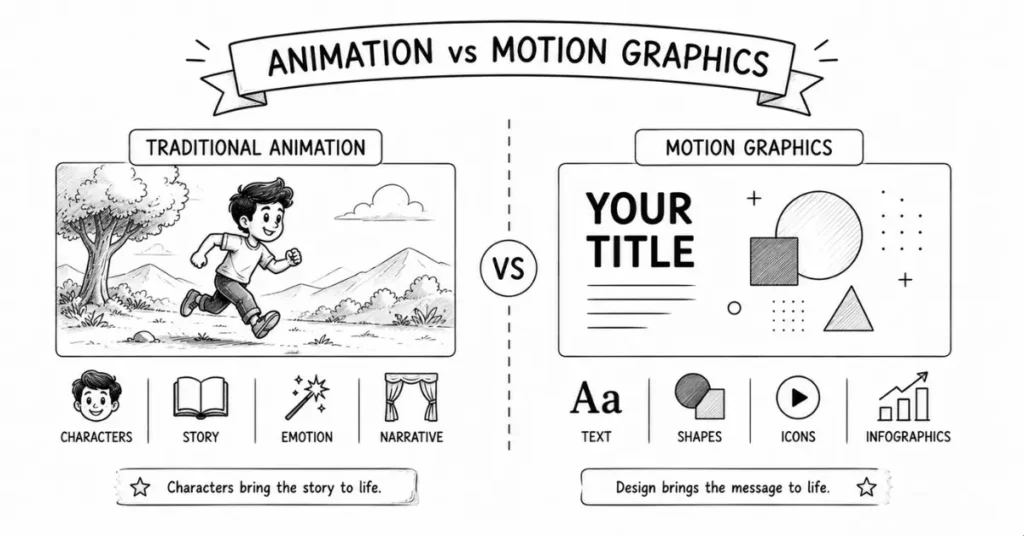
Let’s clear up the confusion first.
Traditional Animation (like cartoons, anime, feature films):
- Focuses on storytelling through characters
- Character design, expressions, dialogue, story arcs
- Examples: Chhota Bheem, Disney movies, anime series, animated feature films
Motion Graphics:
- Focuses on graphic design elements brought to life through movement
- Typography, shapes, icons, infographics, logos animated
- Purpose: communication, branding, marketing, information delivery
- Examples: Animated logos, explainer videos, kinetic text, data visualization, app promo videos
Simple way to remember: If there’s a story with characters and dialogue, it’s traditional animation. If it’s moving text, graphics, and visual elements designed to communicate a message quickly, it’s motion graphics.
Both might use the same software (like After Effects), but the purpose and approach differ.
Where Do You See Motion Graphics Daily?
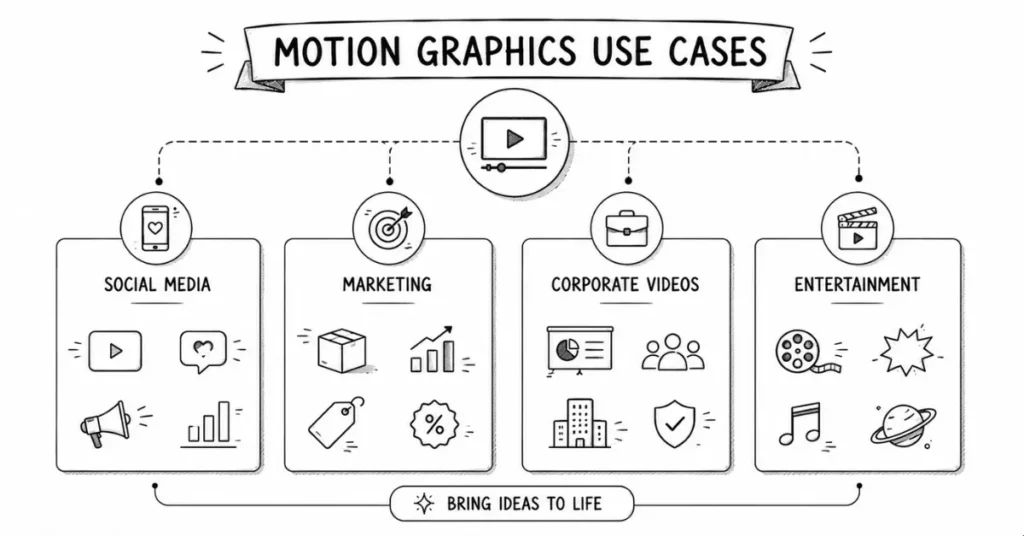
Social Media:
- Instagram stories with animated text and stickers
- LinkedIn carousel posts with smooth transitions
- YouTube video intros and outros
- Animated thumbnails and CTAs
Marketing and Advertising:
- TV commercials with product animations
- Explainer videos for apps and services (like the videos Swiggy or CRED create)
- Animated infographics showing statistics
- Email marketing with animated GIFs
Corporate and Business:
- Company presentation slides with animated charts
- Product demo videos
- Corporate training videos with animated diagrams
- Conference visuals and stage graphics
Entertainment and Media:
- Title sequences for web series and films
- Lower-third graphics in news channels
- Sports broadcast graphics (score updates, player stats)
- OTT platform UI animations
The Indian market particularly needs motion graphics for the massive digital marketing boom, growing OTT content production, and the rise of video-first platforms.
Core Skills You Need for Motion Graphics Design
1. Design Fundamentals (Yes, Even for Motion)
Before adding movement, you must understand static design:
- Typography: Font choices, hierarchy, readability
- Color theory: Palettes that work in motion and evoke the right emotions
- Composition: Layout, balance, visual flow
- Visual hierarchy: Guiding the viewer’s eye through animated sequences
Why this matters: Bad static design doesn’t magically improve when animated it just becomes bad design in motion. Master graphic design basics first.
2. Animation Principles (The 12 Principles)
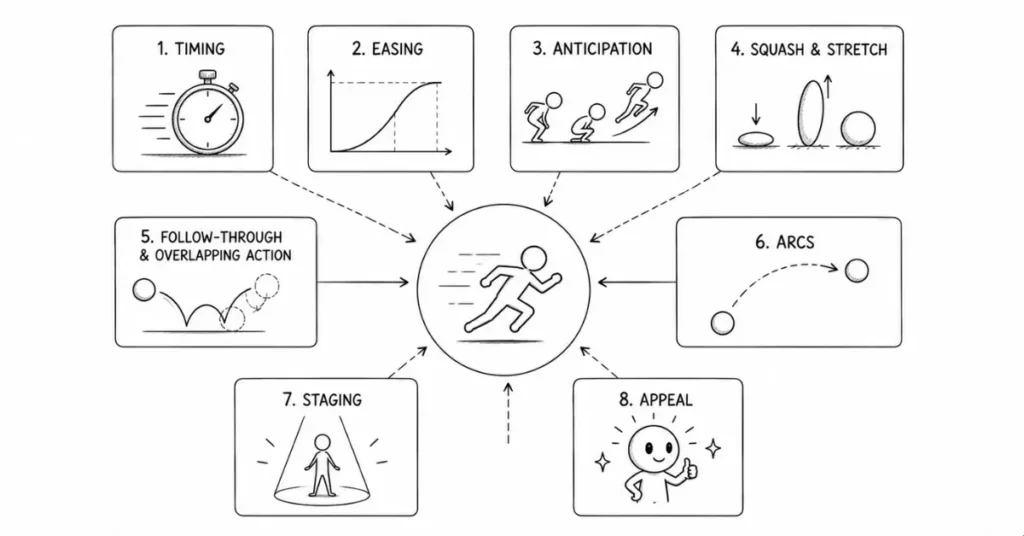
Originally developed by Disney animators, these principles apply to all animation, including motion graphics:
Timing: How fast or slow things move (fast = energetic, slow = elegant)
Easing (Ease In/Ease Out): Nothing in real life moves at constant speed. Objects accelerate and decelerate naturally. This makes motion feel organic, not robotic.
Anticipation: A slight movement before the main action (like pulling back before jumping forward). Creates expectation and natural feel.
Squash and Stretch: Objects deform slightly during movement (makes animation feel alive rather than stiff).
Follow Through and Overlapping Action: Different parts of an object move at different speeds (like hair continuing to move after a head stops).
Arcs: Most natural movements follow curved paths, not straight lines.
Secondary Action: Small movements that support the main action (like a character’s clothes moving when they walk).
Exaggeration: Slightly overstating actions to make them clearer and more impactful.
Solid Drawing/Posing: Understanding weight, balance, and volume (even for 2D graphics).
Appeal: Creating visually pleasing motion that viewers enjoy watching.
Staging: Presenting ideas clearly so the audience knows where to look.
Straight Ahead vs Pose-to-Pose: Different animation approaches (frame-by-frame vs keyframe-based).
You don’t memorize these on day one, but as you practice, you naturally internalize them.
3. Storytelling and Pacing
Even a 10-second logo animation tells a micro-story:
- Setup (logo appears)
- Build-up (elements come together)
- Payoff (final reveal)
Understanding pacing—when to pause, when to speed up, when to let moments breathe—separates good motion graphics from great ones.
For explainer videos, you’re literally telling a story with visuals, voiceover, and animated elements working together.
4. Understanding Video Basics
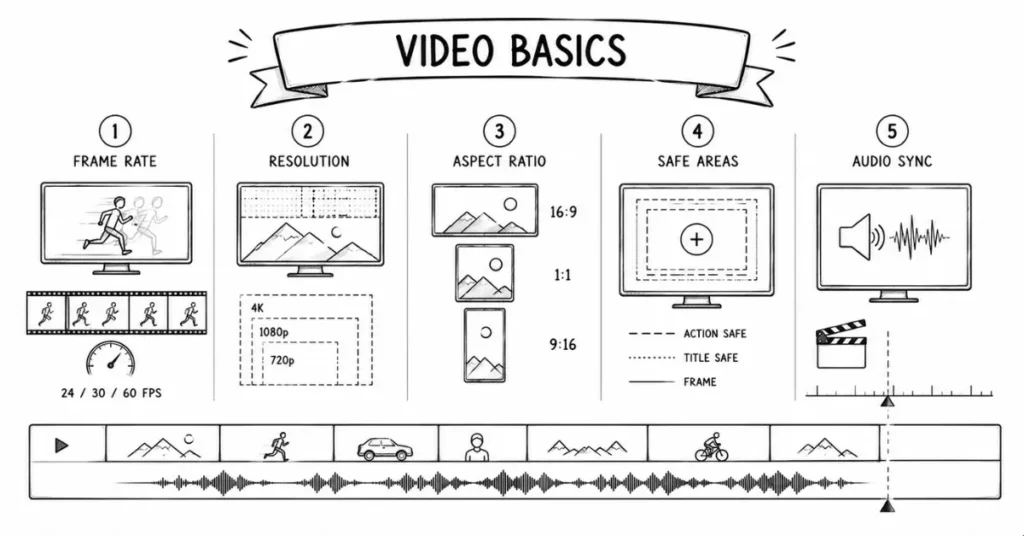
Motion graphics exist in video context, so you need to understand:
- Frame rates: 24fps (cinematic), 30fps (standard video), 60fps (smooth, modern feel)
- Video formats and codecs: MP4, MOV, H.264, ProRes (what works where)
- Resolution and aspect ratios: 1920×1080 (Full HD), 1080×1080 (Instagram), 1080×1920 (Stories), 4K (3840×2160)
- Safe areas: Keeping important elements away from edges (especially for TV/streaming)
Audio sync: Timing animations to music beats or voiceover
5. Typography in Motion (Kinetic Typography)
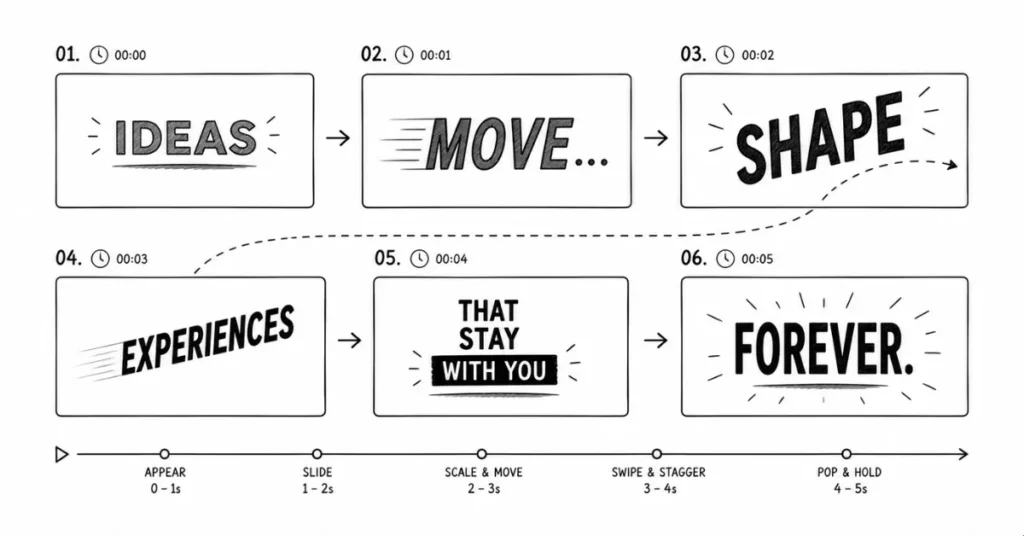
Animating text is a huge part of motion graphics:
- Making text appear in interesting ways (not just “fade in”)
- Creating emphasis through scale, color, and movement
- Ensuring readability (text on screen long enough to read)
- Matching text animation style to brand personality
- Using type to guide narrative flow
Watch any modern brand video half the impact comes from how text is animated.
6. Basic 3D Concepts (Even for 2D Motion Graphics)
Understanding 3D space helps even in 2D motion graphics:
- Camera movements (zoom, pan, dolly)
- Depth and layers (foreground, midground, background)
- Perspective and parallax (objects closer to camera move faster)
- Lighting basics (highlights, shadows, ambient light)
Many motion graphics use “2.5D”—flat graphics positioned in 3D space for depth and dimension.
7. Sound Design Awareness
Motion graphics rarely exist in silence:
- Choosing appropriate music that matches pacing
- Adding sound effects (whooshes, pops, swooshes) to emphasize movements
- Syncing animation to audio beats
- Understanding when silence is more powerful than sound
You might not be a sound designer, but understanding audio enhances your visual work significantly.
Essential Software and Tools
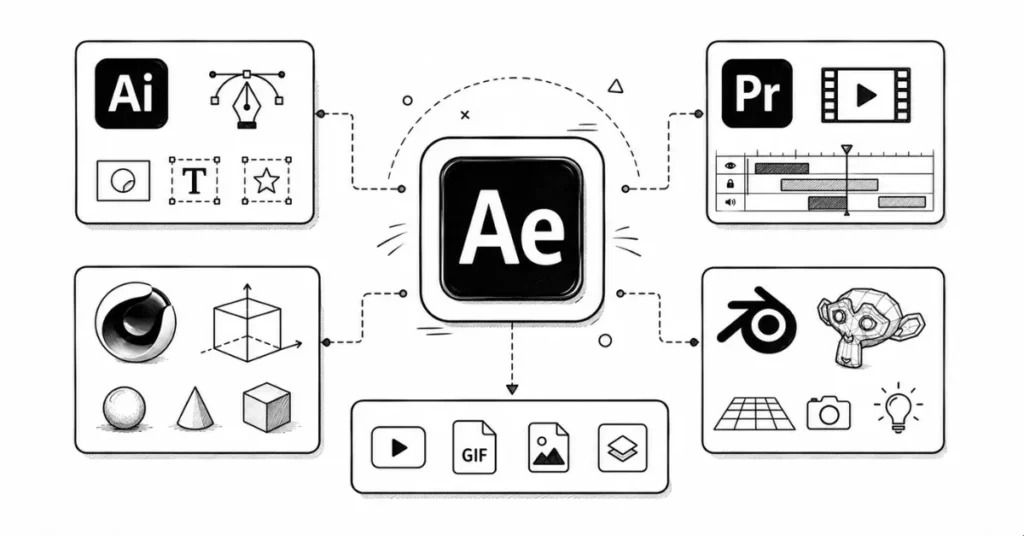
1. Adobe After Effects (The Industry Standard)
After Effects is to motion graphics what Photoshop is to photo editing it’s the primary tool.
What you’ll do in After Effects:
- Animate text, shapes, and graphics
- Create complex animations using keyframes
- Apply effects and filters
- Composite multiple layers
- Work with 3D layers and cameras
- Export final videos in various formats
Key features to master:
- Keyframes and timing
- Shape layers and masks
- Text animation presets
- Effects and presets library
- Expressions (simple code to automate animations)
- Camera and 3D layers
- Plugins (Element 3D, Optical Flares, Trapcode Suite)
Learning curve: Steeper than Photoshop but manageable with structured practice. Most beginners become comfortable in 2-3 months of regular use.
2. Adobe Illustrator (Creating Assets)
You’ll often create graphics in Illustrator (logos, icons, illustrations) and then import them into After Effects to animate.
Why both tools:
- Illustrator: Create clean vector assets
- After Effects: Bring those assets to life with motion
3. Adobe Premiere Pro (Video Editing Companion)
While After Effects handles animation and effects, Premiere Pro is for video editing:
- Cutting and arranging video clips
- Adding transitions between scenes
- Basic color grading
- Audio editing and mixing
Typical workflow:
- Create motion graphics in After Effects
- Edit them together with live footage in Premiere Pro
- Add final touches and export
Many job listings in India ask for both After Effects + Premiere Pro skills.
4. Cinema 4D / Blender (For 3D Motion Graphics)
For more advanced 3D work:
Cinema 4D:
- Industry standard for motion graphics 3D
- Integrates beautifully with After Effects
- Easier learning curve than other 3D software
- Used for product visualization, abstract 3D animations, broadcast graphics
Blender:
- Completely free and open-source
- Powerful 3D capabilities
- Steeper learning curve
- Growing in popularity, especially among freelancers
You don’t need 3D skills immediately, but they significantly increase your value after you master 2D motion graphics.
5. Supporting Tools
Figma/Adobe XD: For UI animation and prototyping
Photoshop: For preparing raster graphics and textures
Audition: For cleaning up audio if needed
Media Encoder: For batch exporting videos in multiple formats
Types of Motion Graphics Work in India
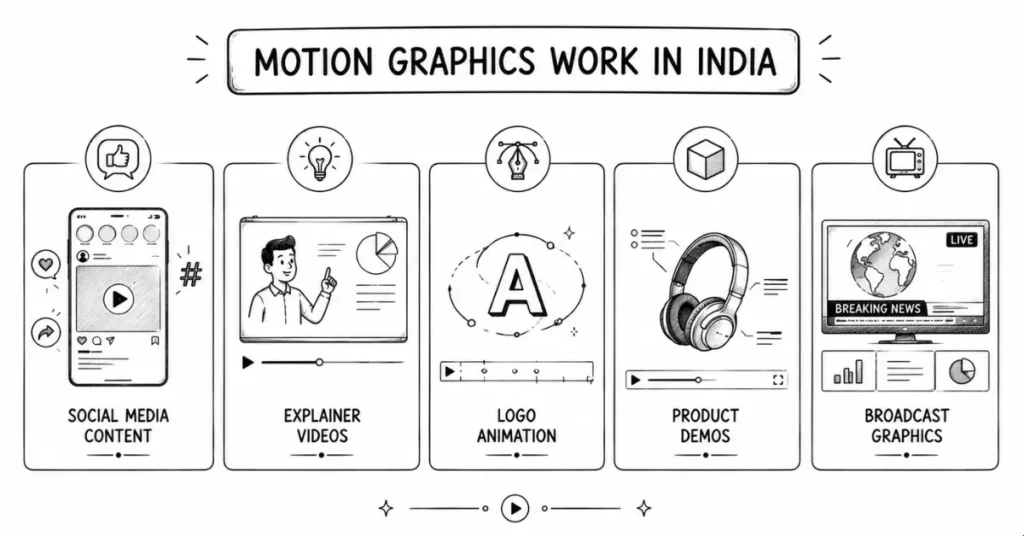
1. Social Media Content
What you create:
- Instagram story templates with animated elements
- LinkedIn carousel posts with smooth transitions
- YouTube intro/outro animations
- Animated posts for brand accounts
- Short-form video content (Reels, Shorts)
Demand level: Extremely high. Every brand needs daily social content.
Typical rates:
- Per post: ₹500-₹2,500 (beginners)
- Per post: ₹2,000-₹7,000 (experienced)
- Monthly retainer (15-20 posts): ₹25,000-₹80,000
2. Explainer Videos
What you create:
- 60-90 second animated videos explaining products/services
- How-to videos with animated diagrams
- Concept explanation videos for startups
- Educational content with animated illustrations
Demand level: Very high, especially in ed-tech, SaaS, fintech sectors.
Typical rates:
- Simple explainer (60 seconds): ₹15,000-₹50,000
- Professional explainer with custom illustrations: ₹50,000-₹1,50,000
- Premium agency work: ₹1,50,000-₹5,00,000+
3. Logo Animation and Brand Motion
What you create:
- Animated logo reveals
- Brand motion systems (consistent animation style across brand materials)
- Animated brand guidelines showing elements in motion
- Signature animations for video content
Demand level: Steady. Every rebrand or new brand might want motion elements.
Typical rates:
- Simple logo animation: ₹5,000-₹20,000
- Complex logo with multiple variations: ₹20,000-₹60,000
- Complete brand motion system: ₹60,000-₹2,00,000+
4. Product Demo and Promo Videos
What you create:
- App feature showcase videos
- Product launch promos
- E-commerce product videos with animated specs
- Tech product demos
Demand level: High, especially in tech and e-commerce.
Typical rates:
- Basic product promo (30 seconds): ₹10,000-₹40,000
- Detailed feature showcase: ₹40,000-₹1,00,000
- Premium launch campaign videos: ₹1,00,000-₹4,00,000+
5. YouTube Content Creation
What you create:
- Channel intros and outros
- Animated thumbnails and title cards
- Subscribe/like animations
- Explainer graphics within videos
- Motion graphic overlays for educational content
Demand level: Massive. India has millions of content creators needing motion graphics.
Typical rates:
- Channel intro/outro: ₹3,000-₹15,000
- Per-video graphics package: ₹2,000-₹10,000
- Monthly content creator retainer: ₹15,000-₹60,000
6. Broadcast and OTT Graphics
What you create:
- Lower-thirds and name plates for shows
- Transition graphics
- Title sequences for web series
- Channel branding elements
- Infographic segments
Demand level: Moderate to high, requires more experience.
Typical employment:
- Full-time positions in production houses: ₹3-8 LPA
- Freelance project basis: ₹50,000-₹3,00,000 per project
7. Corporate and Training Videos
What you create:
- Animated presentation decks
- Training module animations
- Internal communication videos
- Conference and event graphics
Demand level: Steady, less glamorous but reliable income.
Typical rates:
- Corporate presentation animation: ₹10,000-₹40,000
- Training video series: ₹50,000-₹2,00,000
Career Paths and Salary Expectations in India
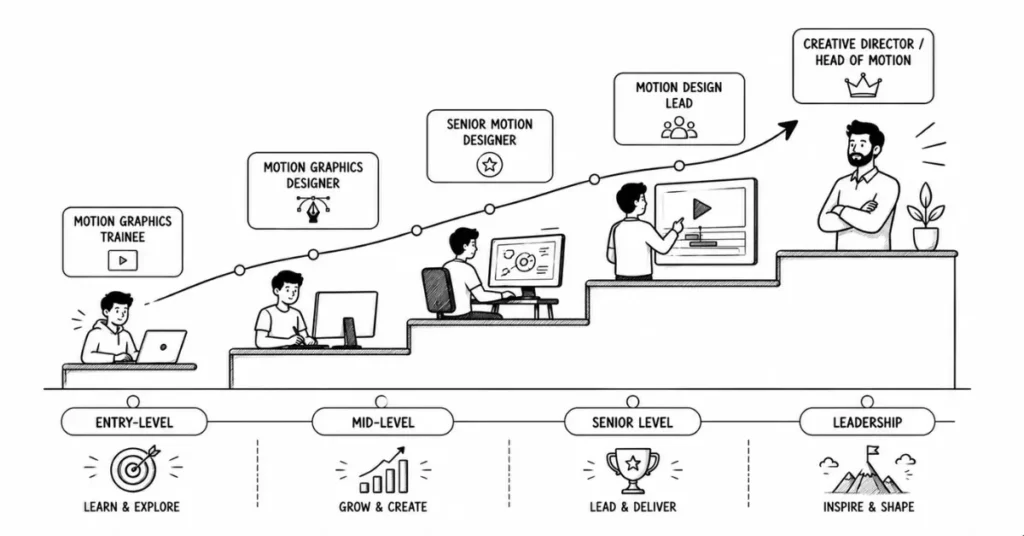
Entry-Level Motion Graphics Designer (0-2 Years)
Job titles:
- Junior Motion Graphics Designer
- Motion Graphics Artist
- Video Editor with Motion Graphics
- Graphic Designer (with After Effects skills)
Salary range:
- Full-time employment (metros): ₹2.5-5 LPA
- Full-time (tier-2 cities): ₹1.8-3.5 LPA
- Freelance monthly earnings: ₹15,000-₹40,000
What you’ll do:
- Execute designs based on senior designer direction
- Create social media content and simple animations
- Assist on larger projects
- Learn workflows and production pipelines
Mid-Level Motion Graphics Designer (3-5 Years)
Job titles:
- Motion Graphics Designer
- Senior Motion Designer
- Motion Graphics
Salary range:
- Full-time (metros): ₹5-10 LPA
- Full-time (tier-2 cities): ₹4-7 LPA
- Freelance monthly earnings: ₹50,000-₹1,50,000
What you’ll do:
- Own complete projects from concept to delivery
- Work directly with clients or creative directors
- Create style frames and animation direction
- Mentor junior designers
Senior Level (5-10 Years)
Job titles:
- Lead Motion Designer
- Motion Graphics Lead
- VFX Artist (if you’ve added 3D skills)
- Animation Supervisor
Salary range:
- Full-time (metros): ₹10-18 LPA[arenaidr]
- Full-time (senior positions in top studios): ₹15-25 LPA
- Freelance monthly earnings: ₹1,50,000-₹4,00,000+
What you’ll do:
- Lead motion graphics for major campaigns
- Manage teams of designers
- Set creative direction for projects
- Handle complex technical challenges
- Interface with senior clients and stakeholders
Leadership and Specialized Roles (10+ Years)
Job titles:
- Creative Director
- Head of Motion Graphics
- VFX Supervisor (for film/OTT work)
- Independent Studio Owner
Salary range:
- Full-time leadership: ₹20-40+ LPA
- Studio owner income: Varies widely based on clients and projects
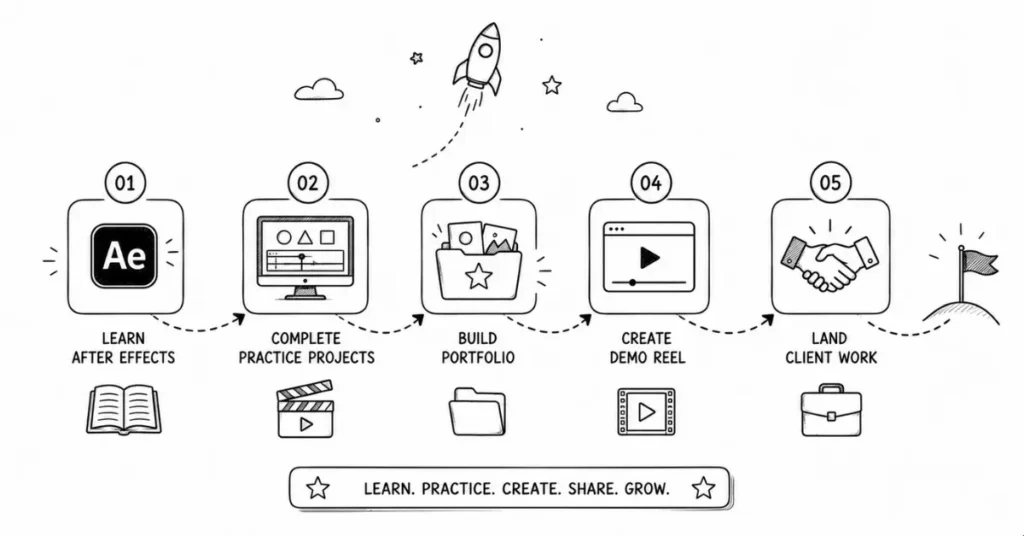
Motion Graphics Career Roadmap: From Beginner to Job-Ready
Phase 1: Foundations (Months 1-2)
Focus: Understanding motion design basics and After Effects interface.
Learn:
- After Effects workspace and basic navigation
- Keyframes and timing fundamentals
- Shape layers and text animation
- Basic effects and presets
- Exporting videos for different platforms
Practice projects:
- Animated text quote (kinetic typography)
- Simple logo animation
- Geometric shape animation (abstract)
- Lower-third name plate animation
- 5-second transition animation
Resources:
- After Effects official tutorials (Adobe’s own YouTube)
- Ben Marriott (YouTube excellent beginner-friendly tutorials)
- School of Motion (free tutorials available)
- Motion Design School (some free content)
Output: 5-8 simple animations showing you understand basic principles.
Phase 2: Building Skills (Months 3-4)
Focus: Creating more complex animations and developing style.
Learn:
- Parent-child relationships between layers
- Null objects for advanced control
- Masks and track mattes
- Basic expressions for automation
- Working with audio and syncing to beats
- Camera layers and 3D space basics
Practice projects:
- 30-second explainer video (simple illustration style)
- Animated social media carousel post
- Product feature showcase (3-4 features)
- Animated infographic (data visualization)
- YouTube channel intro (15 seconds)
Study: Watch and analyze professional motion graphics. Try to recreate sections to learn techniques.
Output: 5-7 portfolio pieces showing variety in style and purpose.
Phase 3: Portfolio and Specialization (Months 5-6)
Focus: Building professional portfolio and finding your niche.
Activities:
- Create 3 polished, case-study-ready portfolio pieces
- Develop 1-2 personal passion projects
- Start sharing work on Instagram and Behance
- Begin applying for internships or junior positions
- Take on first small freelance projects (even at lower rates for experience)
Consider specializing:
- Social media content (huge demand, quick turnarounds)
- Explainer videos (storytelling + animation)
- Logo animation and brand motion (pairs well with brand design skills)
- UI/UX animation (growing field, good intersection with product design)
- 3D motion graphics (higher barrier, less competition)
Output: Professional portfolio with 8-12 strong pieces ready to show employers or clients.
Building Your Motion Graphics Portfolio
What Makes a Strong Motion Graphics Portfolio?
- Variety of Project Types
Show you can handle different needs:
- Social media content (proves you understand platforms)
- Explainer or narrative work (shows storytelling ability)
- Logo animation (demonstrates branding understanding)
- Data visualization (proves you can handle complex information)
- Experimental/personal work (shows creativity and passion)
- Process, Not Just Final Output
For each major piece, show:
- The brief or problem
- Style frames (key visual moments)
- Storyboard or animatic (rough animation preview)
- Final polished version
- Breakdown or making-of (optional but impressive)
- Case Studies for Best Work
Choose 2-3 portfolio pieces and write detailed case studies:
- Client/project background
- Your creative approach
- Technical challenges and how you solved them
- Final results or client feedback
- Demo Reel (Absolutely Essential)
Create a 60-90 second showreel:
- Open with your absolute best 3-5 seconds
- Show variety but maintain flow
- Don’t include work you’re not proud of just to make it longer
- End strong (first and last impressions matter most)
- Include contact info and website
Update quarterly: As you improve, replace weaker pieces with stronger ones.
Where to Showcase Your Work
Behance: Industry standard for motion graphics portfolios. Upload individual projects with detailed breakdowns.
Vimeo: Better video quality than YouTube for showcasing professional work. Many motion designers use Vimeo for their reels.
Instagram: Great for building audience and sharing work-in-progress. Use relevant hashtags (#motiongraphics #aftereffects #motiondesign #mographindia).
Personal website: Eventually invest in your own site. Include demo reel prominently, case studies, about section, and clear contact information.
LinkedIn: Share projects and engage with the design community. Many Indian companies hire through LinkedIn.
Common Mistakes Beginners Make
1. Over-Animating Everything
The mistake: Making every element move constantly because you can.
Why it’s wrong: Creates visual chaos. Viewers don’t know where to look. Feels amateur and exhausting to watch.
The fix: Embrace stillness. Not everything needs to move. Animation should serve the message, not distract from it.
2. Ignoring Easing and Timing
The mistake: Using linear animations (constant speed) for everything.
Why it’s wrong: Feels robotic and unnatural. Nothing in real life moves at constant speed.
The fix: Always apply easing to keyframes. Use Easy Ease (F9 shortcut in After Effects) and adjust curves in Graph Editor.
3. Poor Typography Choices and Readability
The mistake: Using overly decorative fonts, text on screen too briefly, poor contrast with background.
Why it’s wrong: If viewers can’t read your text, your animation fails its primary purpose.
The fix: Choose readable fonts. Keep text on screen long enough (rule of thumb: read it aloud twice—that’s minimum duration). Ensure strong contrast.
4. Not Working with Audio
The mistake: Creating animation without any sound consideration, or adding music as an afterthought.
Why it’s wrong: Audio and visual should work together. Animations synced to music beats feel much more polished.
The fix: Choose music first or at least early. Sync key animation moments to audio beats. Add sound effects to emphasize movements.
5. Inconsistent Style Within Projects
The mistake: Mixing multiple animation styles in one piece (bouncy cartoon style mixed with smooth minimal style).
Why it’s wrong: Feels disjointed and unprofessional.
The fix: Establish a style at the beginning (timing, easing, colors, graphic approach) and maintain it throughout.
6. Exporting at Wrong Settings
The mistake: Exporting huge file sizes, wrong aspect ratios, or incorrect formats for platforms.
Why it’s wrong: Clients can’t use the files, or they look wrong on social platforms.
The fix: Learn export settings for different uses:
- Instagram post: 1080×1080, H.264, MP4, max 60 seconds
- Instagram story: 1080×1920, same settings
- YouTube: 1920×1080 (or 4K), H.264, MP4
Client editable: QuickTime ProRes or high-quality MP4
Your Next Steps: Action Plan
This Week
- Download After Effects (free trial or student subscription)
- Complete an intro tutorial series (choose one and finish it completely)
- Create your first simple animation: animated text quote
- Watch 10 motion graphics pieces you love and note what makes them work
This Month
- Complete 5 beginner projects showing different techniques
- Learn keyboard shortcuts (dramatically speeds up workflow)
- Join one motion graphics community (Reddit r/MotionDesign, Facebook groups, Discord servers)
- Start a Behance or Instagram account and share your practice work
Within 3 Months
- Build 10-15 portfolio pieces
- Create your first demo reel (even if simple)
- Apply animation principles consciously in every project
- Reach out to small businesses or content creators offering affordable services
- Land your first paid project (even ₹1,000 validates your skills)
Within 6 Months
- Have a professional portfolio with 12-15 strong pieces
- Create a polished 60-90 second demo reel
- Apply for junior motion graphics positions or internships
- Build freelance client base (aim for ₹25,000-50,000 monthly income)
- Consider adding one specialization (3D, character animation, UI animation)
Resources for Motion Graphics Designers in India
Learning Platforms
Free:
- YouTube (Ben Marriott, School of Motion free tutorials, ECAbrams, SonduckFilm)
- Adobe’s official After Effects tutorials
- Motion Design School (some free courses)
- Reddit r/MotionDesign tutorials
Paid (Worth Investment):
- School of Motion (courses ₹15,000-50,000, but industry-recognized)
- Motion Design School
- Skillshare (affordable subscription, many motion graphics courses)
- LinkedIn Learning (After Effects courses)
Asset Libraries
Free/Freemium:
- Mixkit (free stock footage and animations)
- Pexels Videos (free stock footage)
- Free Music Archive (audio for projects)
- YouTube Audio Library
Paid (Professional):
- Envato Elements (subscription, unlimited downloads)
- Artgrid (high-quality stock footage)
- Epidemic Sound (royalty-free music)
- Motion Array (templates, stock footage, music)
Plugins That Level Up Your Work
Essential plugins:
- Animation Composer (free, speeds up workflow)
- Motion Bro (free templates and presets)
- Saber (free, light effects)
Premium plugins (invest after establishing career):
- Trapcode Suite (particles, 3D objects, lighting)
- Element 3D (integrate 3D models in After Effects)
- Optical Flares (lens flares and lighting)
- Plexus (connected particles and lines)
Final Thoughts: Why Now Is the Best Time for Motion Graphics in India
India’s digital content consumption has exploded. OTT platforms, social media marketing, YouTube creators, ed-tech companies, fintech apps, e-commerce brands every sector needs motion graphics constantly.
The beauty of this career? You don’t need a specific degree. You don’t need expensive equipment beyond a decent laptop. You don’t need to be in Mumbai or Bengaluru you can work remotely from anywhere in India.
What you need:
- Creativity and willingness to learn
- Consistency in practicing (30-60 minutes daily beats 8 hours once weekly)
- Understanding of design fundamentals
- Proficiency in After Effects
- A portfolio showing what you can create
Motion graphics combines art, technology, storytelling, and problem-solving. If you enjoy seeing your ideas come to life, making static things move meaningfully, and working in one of the most in-demand creative fields, this might be your path.
Every brand video you’ve admired, every smooth app animation you’ve noticed, every engaging social media post you’ve seen someone designed that motion. That someone could be you.
What will you animate today?